

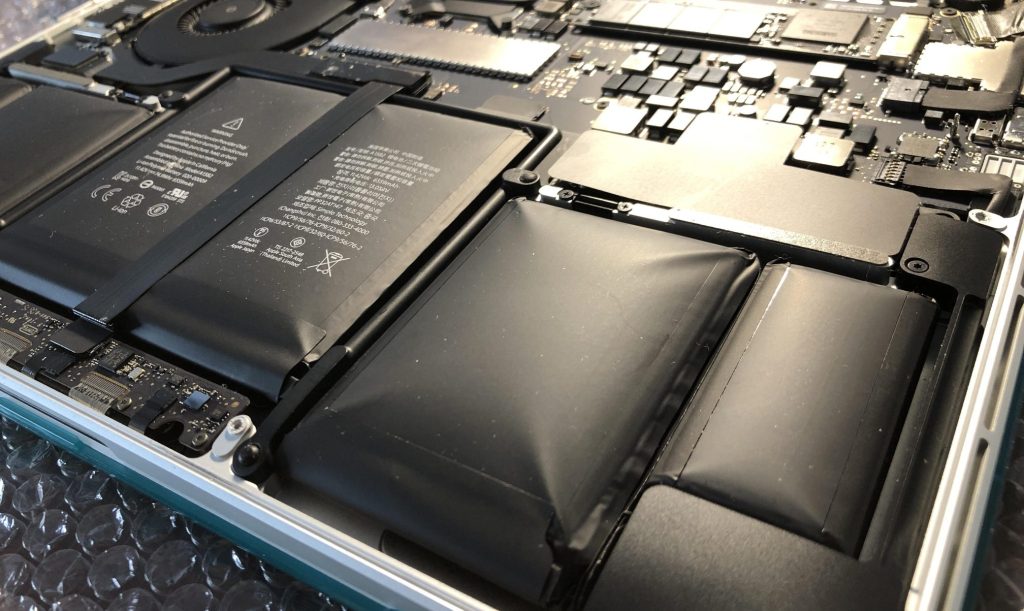
Lithium-ion batteries power nearly every portable device we use—from laptops and smartphones to tablets and accessories. Over time, every battery naturally loses capacity, holds less charge, and eventually needs replacement. But one of the most dangerous issues that can develop is battery swelling. This isn’t just a sign of age—it’s an indication that the battery’s internal chemistry is breaking down, and it can quickly escalate into a serious safety risk.
Why Lithium-Ion Batteries Swell
A swollen battery occurs when gas builds up inside the battery’s sealed pouch. This gas forms as the internal chemical materials degrade, usually due to:
- Age and wear
- Excessive heat exposure
- Manufacturing defects (less common)
- Faulty charging behavior or poor-quality chargers
In most cases, swelling is simply age catching up with the battery. Heavy workloads, gaming, leaving the device plugged in constantly, or using the device while charging all accelerate heat production—and heat is one of the biggest stressors on lithium-ion cells.
Why Swelling Is Dangerous
At first, the swelling might be barely noticeable—maybe the trackpad feels less “clicky,” or the laptop rocks slightly on a flat table. But as pressure builds, the battery begins to physically push components out of place.
This can lead to:
- Trackpads lifting or becoming unusable
- Laptop frames bending or bowing outward
- Phone screens lifting or separating from the bezel
- Internal components becoming crushed or strained
But the real danger is what happens if the battery pouch is punctured or ruptures under pressure. Lithium-ion batteries store highly flammable chemicals. A compromised battery can:
- Catch fire almost instantly
- Be extremely difficult to extinguish with normal household methods
That’s why swollen batteries should never be ignored. No matter how minor the swelling may appear, the situation can turn dangerous very quickly.
Why You Should Not Delay Replacement
A swollen battery never fixes itself. Once the breakdown process starts, pressure continues to build. The longer the battery remains inside the device, the more likely it is to cause permanent structural damage.
Common early symptoms include:
- A clicking, stiff, or misaligned trackpad
- The bottom casing not sitting flush
- A slight bulge in the keyboard
- Wobbling when placed on a flat surface
If these signs are overlooked, the battery may expand enough to crack the trackpad, warp the metal casing, or damage connectors that run directly above the battery cells. At that point, repair costs increase dramatically compared to simply replacing the battery early.
Why MacBook Battery Replacements Are Much Harder
Many Windows laptops use screw-in batteries that detach cleanly once the back panel is removed. Swollen or not, the process is manageable and relatively low risk.
MacBooks are a different story.
Apple secures many of their battery cells using strong industrial adhesive, bonding them tightly to the top case. Removing these batteries requires:
- Solvent (usually isopropyl alcohol) to weaken the adhesive
- Slow, controlled prying techniques
- Extreme caution to avoid puncturing an already swollen cell
The difficulty increases dramatically when the battery is swollen, because pushing or bending the cell too much can cause it to rupture. The battery also sits directly under the trackpad and keyboard, which often shift or warp due to the swelling, adding another layer of delicacy to the repair.
This is why inflated MacBook batteries are one of the more stressful repairs technicians handle—one wrong move can be dangerous.
How Technicians Handle Swollen Batteries Safely
When you bring in a device with a swollen battery, the priority is safety. A technician will:
- Carefully open the device without applying direct pressure to the battery.
- Evaluate the level of swelling to determine whether the frame or components have already been affected.
- Slowly weaken and remove adhesive, especially in MacBooks, using solvent and controlled motion.
- Inspect internal parts—trackpads, cables, brackets—for damage caused by the pressure.
- Install a new battery and verify proper charging behavior.
If swelling has warped the frame or damaged the trackpad, additional repairs may be needed.
Final Thoughts
Inflated lithium-ion batteries are not a cosmetic issue—they are a safety hazard that needs to be addressed as soon as it’s noticed. Whether it’s a Windows laptop with an easily removable battery or a MacBook with adhesive-bonded cells, swollen batteries require careful, immediate attention.
If you notice any signs of swelling, even subtle ones, stop using the device and have it checked by a professional right away. Acting early can prevent serious damage—and prevent a dangerous situation from unfolding.
 ITBrother
Leave a comment