

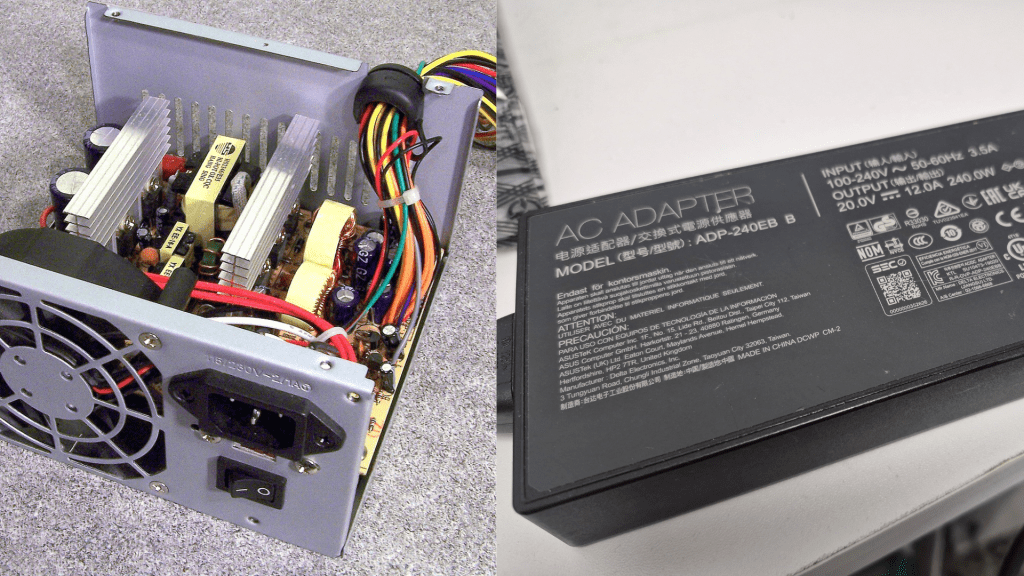
A Deep Look at Causes, Risks, and Repair Options
A sudden loud pop, electrical smell, or burning odor coming from a computer is one of the most alarming hardware failures a user can experience. While not extremely common, catastrophic power-related failures do happen—and when they do, the results can range from a simple power supply replacement to complete system loss.
This issue affects both desktop computers and laptops, and while the underlying causes share similarities, the consequences differ significantly between the two due to differences in design, modularity, and power-delivery architecture.
This article breaks down why this happens, what kind of secondary damage is possible, whether a system can be salvaged, and what services a repair technician can provide in these situations.
What Causes the “Pop”? Understanding Why Power Supplies Fail
A power supply failure with a popping sound is almost always caused by a component inside the power delivery circuitry suddenly failing—typically a capacitor, MOSFET, or voltage regulation component. The failure produces the characteristic pop followed by a smell similar to burned electronics.
There are multiple reasons this can occur, but the most common and well-documented include:
1. Electrical Surges or Spikes
This is the most common cause of catastrophic PSU failure.
- Electricity from the wall is not perfectly stable—voltage can fluctuate.
- A surge or spike (from grid issues, power outages, lightning, faulty wiring, etc.) can overload the PSU’s protective circuitry.
- When the surge exceeds what the PSU can safely handle, internal components can fail violently.
Using a surge protector or an uninterruptible power supply (UPS) greatly reduces this risk.
Many users who plug their systems directly into the wall—especially in older buildings—are more vulnerable to these events.
2. Aging Components (Especially Capacitors)
Over time, capacitors degrade due to:
- Heat exposure
- Natural chemical aging
- Dust buildup
- Higher-than-intended electrical loads
Old or low-quality capacitors are more prone to bulging, leaking, and eventually failing with a pop.
3. Heat and Poor Airflow
Excessive heat shortens the lifespan of every power-related component.
- Dust accumulation
- Blocked vents
- Failing cooling fans
- Heavy sustained workloads
All of these conditions accelerate component wear inside both desktop PSUs and laptop power-delivery systems.
4. Manufacturing Defects or Design Flaws
While rare, some power supplies—especially low-cost generic models—have poor-quality components or insufficient protection circuitry. These units fail more frequently and more drastically.
5. Liquid Damage and Humidity Effects
Liquid damage can short high-voltage components immediately.
Even without direct contact, high humidity can cause corrosion and degradation of internal components.
- More common in laptops (spills, steam, condensation)
- Possible in desktops if used in very humid environments like basements or garages
Damage from moisture often weakens components before they fail abruptly.
What Happens During a Power Supply Failure?
The severity of secondary damage varies widely depending on the computer design.
Laptops: High Risk of Full System Death
Laptops do not have a separate, replaceable power supply like desktops. Their internal power-delivery circuitry (DC-in board, charging IC, MOSFETs, power rails) is integrated into the motherboard.
When this circuitry experiences a catastrophic failure:
- It can kill the entire motherboard instantly.
- In many cases, the laptop becomes completely unresponsive.
- Repair may require board-level microsoldering, if possible at all.
- Data storage (SSD) is usually still intact and recoverable.
A “pop” inside a laptop almost never means a simple or cheap repair, which is why prevention (using quality chargers and avoiding liquid exposure) is crucial.
Desktops: More Modular, More Salvageable
A desktop PSU is a standalone unit designed with multiple layers of protection. When it fails:
- Sometimes the PSU sacrifices itself and protects the rest of the system.
- Other times, especially during a large surge, damage can spread.
Common secondary damage includes:
- Motherboard failure – most likely to die because it connects directly to PSU rails.
- RAM damage – less common, but possible from voltage spikes.
- Storage (HDD/SSD) damage – possible but fairly rare.
- CPU or GPU damage – uncommon but can happen during severe surges.
A desktop is usually repairable because components can be replaced individually, but cost depends on how many parts were damaged.
Is the System Salvageable?
Here’s the realistic breakdown:
If the PSU simply failed internally (no major surge):
- Desktop: Very likely salvageable; replace PSU and test other components.
- Laptop: Usually requires motherboard repair or replacement.
If a power surge occurred:
- Desktop: Mixed results—may need motherboard and PSU at minimum.
- Laptop: Often total motherboard failure.
If a burning smell persists or visible damage is present:
- Do not attempt to power the system again.
- Further attempts can worsen damage.
Professional Services Typically Needed for This Issue
When a power supply failure occurs, professional diagnosis is essential. Here is what a technician—such as yourself—would typically provide for clients dealing with this situation:
1. Full Diagnostic Testing
This includes:
- Inspecting the failed PSU or motherboard
- Checking for shorted circuits
- Testing external power adapters (for laptops)
- Verifying whether components still receive regulated voltage
This step determines the repair path and assesses whether the system is salvageable.
2. Data Backup & Data Safety Measures
Since data is almost always the most important asset:
- Remove the storage drive (HDD/SSD)
- Check for damage or corruption
- Back up important user files to external storage
Even when the system is dead, data is usually recoverable unless the storage device was directly damaged.
3. Power Supply Replacement (Desktops)
If the issue is isolated to the PSU, technicians:
- Replace it with a properly rated, higher-quality unit
- Ensure compatibility and clean power delivery
- Test the system to confirm no secondary damage
4. Cleaning & Safety Inspection
Electrical failures often leave residue or burnt components.
A technician will:
- Clean internal dust and debris
- Inspect for melted cables or connectors
- Ensure no lingering short circuits exist
This reduces the chance of repeated failure.
5. Motherboard Repair or Replacement
If a surge damages the motherboard:
- For desktops: board replacement is straightforward.
- For laptops: may require board-level repair or full board replacement.
6. Operating System Reinstallation (If Needed)
If the storage drive survives but the system becomes unstable, an OS reinstall ensures:
- Stable boot performance
- No file corruption
- Clean, reliable system state
7. Optional Hardware Upgrades
If parts need replacing, customers often choose to upgrade at the same time, such as:
- Switching from HDD to SSD
- Upgrading RAM
- Installing a higher-quality, better-protected PSU
- Adding a UPS or better surge protection
These upgrades increase reliability and reduce future risk.
Final Thoughts
A power supply “pop” is a frightening experience, but it doesn’t always mean the entire system is lost. Desktops benefit heavily from their modular design, making recovery far more feasible. Laptops, on the other hand, tend to suffer more severe internal damage due to their integrated power circuitry.
Regardless of the system, professional diagnosis is essential. Services like data backup, power component testing, system cleaning, PSU replacement, OS reinstallations, and hardware upgrades play a vital role in restoring reliability and preventing future incidents.
 ITBrother
Leave a comment