

The MacBook Pro Flexgate issue is a well-documented display problem that primarily affects certain 2016 and 2017 MacBook Pro models. Many users experience sudden screen failure with no visible cracks, no liquid damage, and no history of drops. One day the display works perfectly fine, and the next day it goes completely black.
If your MacBook Pro screen turns off unexpectedly or only works at certain angles, you may be dealing with Flexgate.
In this guide, we’ll explain what Flexgate is, why it happens, which models are affected, and what repair options are realistically available.
What Is MacBook Pro Flexgate?
“Flexgate” is not an official Apple term. It is a nickname created by the online repair community to describe a design-related display cable failure in certain MacBook Pro models.
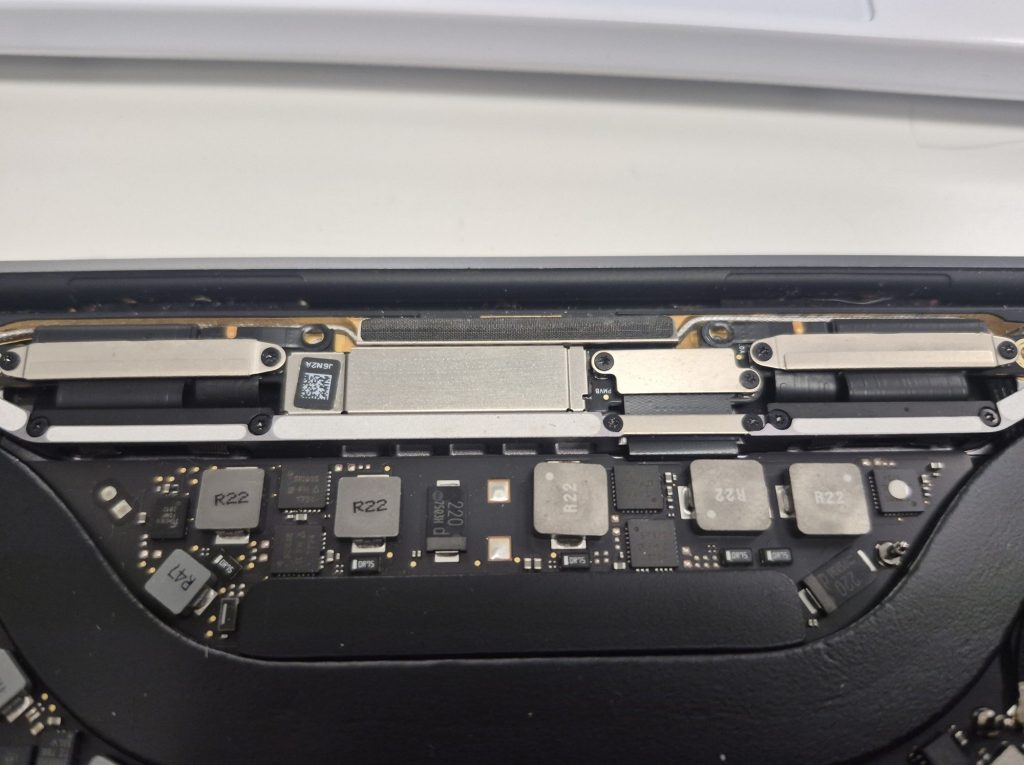
The issue stems from the display flex cable that connects the screen to the logic board. In 2016–2017 MacBook Pro models, Apple redesigned the internal layout to make the laptop thinner. As part of that redesign, the display cable was wrapped tightly around the hinge mechanism.
Each time the laptop is opened and closed, the cable bends and flexes. Over time, this repeated stress can cause the cable to weaken, stretch, or partially tear. Eventually, the display may stop functioning properly.
That repeated “flexing” motion is where the name Flexgate comes from.
Which MacBook Pro Models Are Affected?
Flexgate most commonly affects:
- 2016 MacBook Pro (13-inch and 15-inch)
- 2017 MacBook Pro (13-inch and 15-inch)
Apple later made design adjustments in 2018 by slightly lengthening the display cable. However, there have still been isolated reports of similar symptoms in some 2018 and 2019 models.
The issue is significantly more common in the 2016–2017 generation.
Common Flexgate Symptoms
Flexgate does not look like a traditional broken screen. Most affected users report no physical damage. Instead, symptoms typically include:
- Screen suddenly goes black with no visible cracks
- Backlight failure while the display image is faintly visible
- “Stage light” effect at the bottom of the screen
- Screen works only at certain opening angles
- Display cuts out when opening the lid beyond a certain point
One of the strongest indicators is when adjusting the screen angle temporarily restores the image. This suggests the display cable is partially damaged but not fully severed.
Importantly, the laptop itself usually still powers on. If you connect an external monitor, it will often work normally. That confirms the logic board is functioning and the issue is isolated to the display assembly.
Why Does Flexgate Happen?
The root cause is mechanical stress.
In the 2016 redesign, Apple used a display cable that was engineered to be almost the exact required length. There was minimal slack built into the cable. Because of this, repeated opening and closing gradually stretched the cable beyond its tolerance.
Over hundreds or thousands of open/close cycles, micro-tears can develop in the cable’s internal traces. Once those traces break, the display signal or backlight power is interrupted.
While Apple did later extend the cable length slightly in newer revisions, the earlier models remain the most vulnerable.
Can Flexgate Be Fixed?
There are realistically three possible approaches, but only one provides a reliable long-term solution.
1. Reseating the Display Cable
In some cases, technicians may attempt to reseat the display cable connection on the logic board side. If the cable has slightly shifted or is making inconsistent contact, reseating it could temporarily restore the display.
However, this is rarely a permanent fix. If the cable itself has been stretched or internally damaged, reseating does not address the root problem.
Because the cable is secured with a metal bracket and screws, full disconnection is uncommon. The failure is typically internal cable damage rather than a loose connector.
Reseating may buy time, but it should not be considered a guaranteed repair.
2. Replacing the Entire Display Assembly (Most Common Fix)
The most common and reliable fix for MacBook Pro Flexgate is replacing the entire top display assembly.
Unfortunately, the display cable is integrated into the screen assembly itself. It is not designed to be replaced independently. Apple does not provide the cable as a separate service part.
Because of this, most repair shops replace:
- The LCD panel
- The display housing
- The integrated display cable
This is the safest and most predictable repair method.
3. Cable-Only Repair (High Risk, Limited Availability)
Some highly specialized board-level repair shops attempt micro-soldering repairs to extend or replace the display cable. However, this type of repair is complex and carries significant risk.
Removing the screen from the aluminum lid can damage:
- The display panel
- The webcam
- The Wi-Fi antenna assembly
- The outer housing
Due to these risks, many professional repair shops do not offer cable-only repair services.
Is Flexgate Covered by Apple?
Apple did launch a limited repair program for certain 13-inch MacBook Pro models manufactured in 2016. However, that program had eligibility requirements and time limits.
If your device is out of warranty or outside the repair program window, repair costs typically fall on the owner.
How Much Does Flexgate Repair Cost?
Costs vary depending on model and screen size. Replacing a MacBook Pro display assembly is significantly more expensive than repairing a simple connector issue.
That said, replacing the display is still often more affordable than replacing the entire laptop — especially for higher-end configurations.
If the rest of the laptop (keyboard, battery, logic board) is in good condition, replacing the display can extend the machine’s usable life by several more years.
Should You Repair or Replace the Laptop?
If your MacBook Pro is from 2016–2017 and experiencing Flexgate symptoms, repair is usually worth considering if:
- The device still performs well
- The battery health is acceptable
- There is no logic board damage
- The cost of repair is significantly less than replacement
However, if the laptop is already experiencing multiple unrelated issues, upgrading may make more sense.
Final Thoughts on MacBook Pro Flexgate
MacBook Pro Flexgate is a design-related display cable issue that primarily affects 2016–2017 models. The problem is caused by repeated stress on a tightly routed display flex cable near the hinge.
While temporary fixes like reseating may occasionally help, the only consistent long-term solution is replacing the full display assembly.
If your screen turns off unexpectedly, works only at certain angles, or shows backlight irregularities, it’s worth having the device professionally diagnosed. Catching the issue early may prevent complete display failure.
Understanding what Flexgate is — and what it is not — helps you make an informed decision about whether repair is worth it for your specific MacBook Pro.
 ITBrother
Leave a comment