

A charging port that feels loose but still charges is one of the most common issues people experience with laptops, phones, and tablets. At first, it may not seem like a serious problem because the device still receives power. However, that loose feeling is often an early warning sign that the charging port is beginning to wear out.
In many cases, devices will continue charging normally for weeks or even months despite a loose port. The problem is that the looseness usually indicates that the internal structure of the port is weakening. If the issue continues to worsen, it can eventually lead to intermittent charging or a complete failure of the charging port.
Understanding why charging ports become loose can help prevent further damage and may even extend the lifespan of the device.
Why Charging Ports Start to Feel Loose
Charging ports are designed to hold the charging cable firmly in place. Inside the port are small metal connectors that grip the plug when it is inserted. This grip ensures that the electrical contacts remain stable while power is transferred to the device.
Over time, however, repeated use slowly wears down the internal connectors. When the charging cable is inserted and removed hundreds or even thousands of times, the internal contact points can gradually lose their tension.
When this happens, the charging plug may begin to move slightly inside the port. The device may still charge, but the cable might feel unstable or wiggle more than it used to.
This looseness can also allow small movements while the charger is plugged in. Even slight movements can place stress on the internal pins and solder joints of the charging port. At first, this does not immediately cause a failure, but repeated stress over time can damage the connection.
The most common causes of a loose charging port include:
- Normal wear from frequent charging
- Accidental movement of the cable while plugged in
- Dust or debris building up inside the port
- Physical stress on the port when the device is moved during charging
While these issues may seem minor at first, they often lead to more serious charging problems if left unaddressed.
Why a Loose Charging Port Can Become a Bigger Problem
Many people continue using their device normally when the charging port feels loose because it still works. The real problem is that the internal components of the port are not designed to tolerate constant movement.
When the cable moves inside the port, it can slowly damage the internal pins or weaken the solder joints connecting the port to the device’s motherboard.
At first, the symptoms might include small inconveniences such as needing to adjust the cable slightly to maintain charging. Over time, the connection can become unstable and eventually stop working entirely.
Common warning signs that the charging port is beginning to fail include:
- The charger must be positioned a certain way to charge
- Charging stops when the cable is moved slightly
- The connector feels noticeably loose when inserted
- The device charges intermittently or slowly
Once these symptoms appear, the charging port is often already experiencing internal damage.
How Charging Port Design Has Changed Over Time
Charging port problems have existed for as long as electronic devices have used removable charging cables. However, the way charging ports are designed has changed significantly over the years.
Older laptops often used a charging port connected to the motherboard through a cable rather than being soldered directly onto the board. The port itself was usually mounted to the laptop’s internal frame.
This design meant that the port could shift or break if the plastic frame holding it in place became damaged. In many older laptops, the surrounding plastic housing would crack after years of use. When that happened, the charging port would move inside the laptop chassis and feel loose even though the connector itself was still functional.
Repair shops sometimes solved this issue by securing the port back into place when replacement frames were unavailable or too expensive.
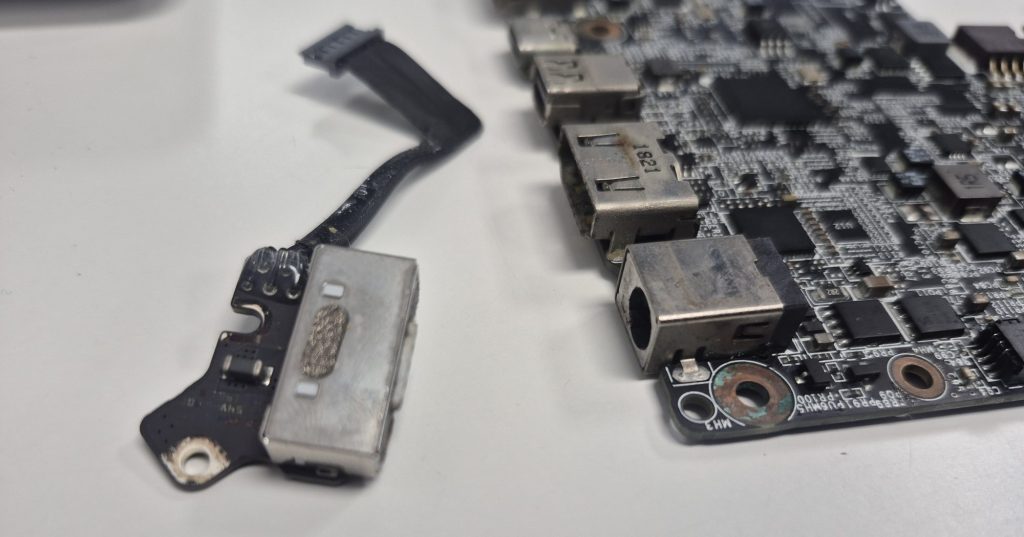
Modern laptops and mobile devices are built differently. Most devices today use charging ports that are either:
- Soldered directly onto the motherboard
- Mounted on a small daughterboard connected to the motherboard
These designs improve stability and make the port more secure. However, they also mean that repairs can be more complex if the charging port becomes damaged.
What Can Be Done If the Charging Port Feels Loose
If a charging port feels loose but still charges, there are usually only a few realistic repair options. The best solution depends on the condition of the port and the type of device involved.
In many cases, technicians will consider the following repair approaches:
- Cleaning debris from the charging port if dust buildup is causing poor contact
- Re-soldering the charging port if the solder joints have cracked or weakened
- Replacing the charging port entirely if the internal connectors are worn out
If the charging port is still functioning but the connection is unstable, re-soldering may temporarily restore stability. However, if the internal connectors inside the port have already worn down, replacing the port is typically the more reliable solution.
Replacing the charging port ensures that the device has a strong and stable electrical connection again. This repair also helps prevent further damage to the motherboard caused by unstable power connections.
Why Early Repair Can Prevent Larger Issues
Many people delay repairing a loose charging port because the device still charges. Unfortunately, continuing to use a loose port can eventually cause more serious internal damage.
If the port shifts repeatedly while charging, it can place stress on the motherboard and surrounding circuitry. In severe cases, the constant movement can damage the motherboard pads where the charging port is attached.
Once that happens, the repair becomes significantly more difficult and expensive.
Addressing the problem early can prevent these complications. Replacing a worn charging port is usually a straightforward repair compared to repairing motherboard damage caused by a failed port.
Final Thoughts
A charging port that feels loose but still charges should never be ignored. While the device may appear to function normally, the looseness often indicates that the port is beginning to wear out.
Over time, continued movement inside the port can damage the internal connectors or solder joints. Once that damage progresses far enough, the device may stop charging entirely.
If you notice that your charger feels unstable or requires adjustment to work properly, it may be worth having the device inspected before the problem becomes worse. Early diagnosis and repair can help restore a stable charging connection and prevent more expensive repairs later on.
 ITBrother
Leave a comment