

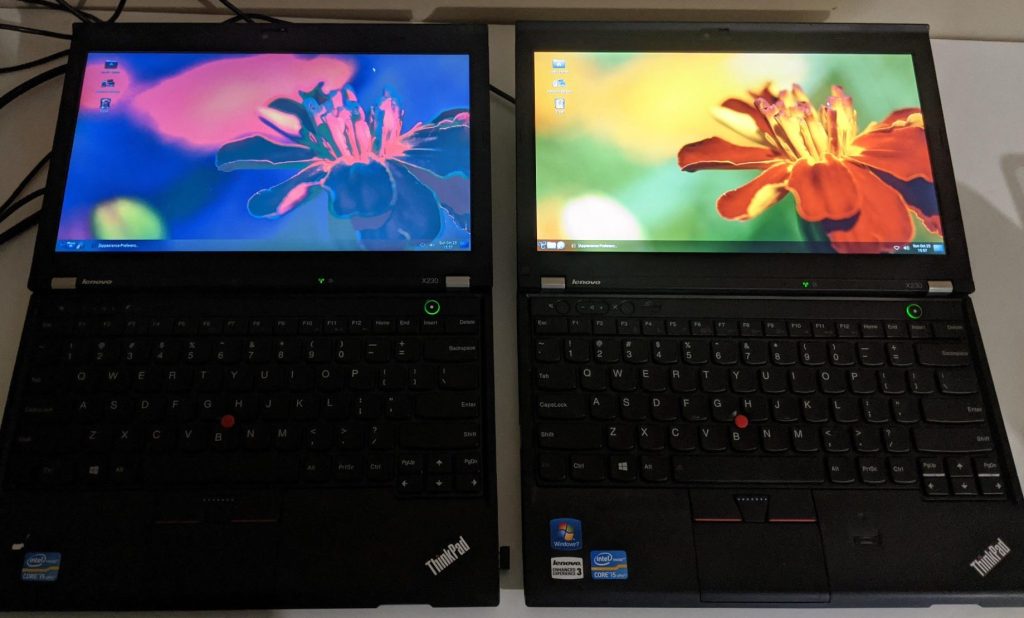
Replacing a damaged laptop screen can restore a device that might otherwise seem unusable. Cracked displays, flickering panels, or broken backlights are common problems that many laptop owners encounter. However, after a screen replacement, some users notice that the new display doesn’t look as good as the original. Colors may appear washed out, brightness may be lower, or viewing angles may be noticeably worse.
This issue often occurs when inexpensive replacement screens are used. While cheaper panels can reduce repair costs, they may also sacrifice display quality in ways that become immediately noticeable during everyday use.
In this article, we’ll explain why cheap replacement laptop screens sometimes look worse, what differences exist between panel types, and how to ensure you get the best possible display quality during a repair.
Not All Laptop Screens Are the Same
At first glance, many laptop screens appear identical. Two panels may have the same size, resolution, and connector type, yet still deliver very different visual quality. Depending on the type of laptop, the manufacturer will use a specific display that will fit the laptop’s intended purpose.
For example, gaming laptops would usually use a high resolution panel with a higher refresh rate for gaming. While normal office laptops would use a standard resolution panel that is at least full HD.
Replacement panels sold online or through parts suppliers may technically fit the laptop, but they are not always identical to the original display.
This is one of the most common reasons a replacement screen may look worse.
Different Panel Technologies Affect Image Quality
One of the major factors that affects display quality is the panel technology used in the screen. There are two types of panels that laptops use.
TN (Twisted Nematic) Panels
TN panels are typically the cheapest displays to manufacture. While they are fast and inexpensive, they also have few major drawbacks:
- Poor viewing angles
- Lower color accuracy
- Lower contrast ratios
- Washed-out appearance when viewed from the side
Many budget replacement screens use TN technology because it is widely available and inexpensive.
IPS (In-Plane Switching) Panels
IPS panels provide significantly better image quality. It usually offers:
- Wider viewing angles
- More accurate colors
- Better contrast
- More consistent brightness across the screen
If the original laptop used an IPS panel but the replacement is a TN panel, the difference will be immediately noticeable. Even when both panels share the same resolution, the visual experience can feel drastically different.
Brightness Differences Between Panels
Another common complaint with cheaper replacement screens is reduced brightness. IPS panels can reach higher brightness levels compared to their cheap TN counterparts.
If a replacement screen has lower brightness capability, users may notice:
- Dimmer display overall
- Difficulty seeing the screen in bright environments
- Reduced contrast between colors
Brightness differences are especially noticeable outdoors or in well-lit rooms.
Color Accuracy and Color Gamut
Original laptop screens are often chosen to meet certain color standards. Cheap replacement panels may have a much narrower color gamut, meaning they cannot reproduce the same range of colors.
Common symptoms of poor color reproduction include:
- Muted or dull colors
- Skin tones appearing inaccurate
- Photos looking flat or lifeless
- Difficulty editing photos or videos accurately
For users who work with images, design, or video editing, using a cheaper screen will be more detrimental for work quality. It is best to replace the screen with the exact same one or something very similar to it in terms of specs.
Lower Quality Backlighting
Laptop displays use LED backlights to illuminate the panel. Higher-quality screens typically use better backlight systems that provide:
- Even brightness across the display
- Better energy efficiency
- More consistent color temperature
Cheaper replacement screens may suffer from:
- Uneven brightness
- Backlight bleeding near the edges
- Slight color tint differences across the screen
These issues are not always obvious immediately but can become noticeable over time.
Panel Manufacturers and Quality Control
Another reason cheap replacement screens may look worse is manufacturer quality control. Original laptop displays are often produced by well-known panel manufacturers such as:
- LG Display
- AU Optronics
- BOE
- Samsung Display
Replacement panels sold at very low prices may come from secondary production batches or less strictly controlled manufacturing lines. While many of these screens still function properly, they may not match the original panel’s performance or specifications.
This is why two screens with the same specifications can still deliver different image quality.
Resolution Does Not Guarantee Quality
One common misconception is that resolution determines display quality. While resolution is important, it does not tell the whole story. Two screens with the same resolution, let’s say 1920×1080 (Full HD), can look very different depending on the:
- Panel technology/ Manufacturer
- Color accuracy/ levels
- Brightness levels
- Viewing angles
- Backlight design
A cheap Full HD replacement screen may still look noticeably worse than the original display if these other factors are inferior.
How We Avoid a Poor Quality Replacement Screen
If you want your laptop display to look as good as possible after a repair, we try to make sure a few things before we decide on a screen replacement
Request the Original Panel Model
Whenever possible, we try to replace the screen with the exact same panel model that originally came with the laptop. This helps ensure a guaranteed identical performance and look.
Find a Different Iteration of the Same Screen
If we can’t find the exact same display as the original, we try to find one with the same model number iteration. Sometimes, these panels will have the same exact model number but have different version numbers. This doesn’t make a noticeable difference and in many instances the version difference is mainly a small alteration.
Use Trusted Parts Suppliers
Reputable suppliers typically provide better quality panels and more consistent parts. While these screens may cost slightly more, they often make sure that the screen replacement is recommended for a device and have great warranty policies.
Final Thoughts
Cheap replacement laptop screens can restore functionality to a damaged device, but they don’t always match the quality of the original display. Differences in panel technology, brightness, color accuracy, and manufacturing quality can all affect how the screen looks after a repair.
If display quality matters to you, it’s worth asking about the exact replacement panel being used. Choosing a higher-quality screen can significantly improve the overall experience and help your laptop look just as good as it did before the damage.
Understanding these differences can help users make better decisions when repairing a laptop and avoid disappointment after a screen replacement.
 ITBrother
Leave a comment