


A customer recently brought us a MacBook Pro Retina 13-inch — model A1398, EMC 2910 — stuck in a boot loop. It would power on, show the Apple logo, start filling the loading bar, and then restart right at the same point, over and over. If you’ve searched your way to this post because your own MacBook is doing exactly that, we want to save you the several hours it took us to find the answer: on this specific model, a dead or failing battery can cause a full boot loop, even with the charger connected. That’s not how most MacBooks behave, which is exactly why it’s easy to misdiagnose.
The Symptom: Apple Logo, Loading Bar, Restart, Repeat
The failure pattern looked textbook for a storage or macOS-level issue. Power on, Apple logo appears, progress bar begins to fill, and then the machine reboots and repeats the exact same sequence indefinitely. On most MacBook models we service, this signature points toward the SSD, a corrupted macOS installation, or occasionally a logic board fault — in that order. So that’s where we started.
Ruling Out the Usual Suspects
Booting issues on a Mac are almost always tied to the storage device first, even though everything in these systems is interconnected enough that other components can produce similar symptoms. Our first move was swapping in a known-good test SSD. The boot loop continued exactly as before — same point in the loading bar, same restart. That ruled out the customer’s drive as the sole cause.
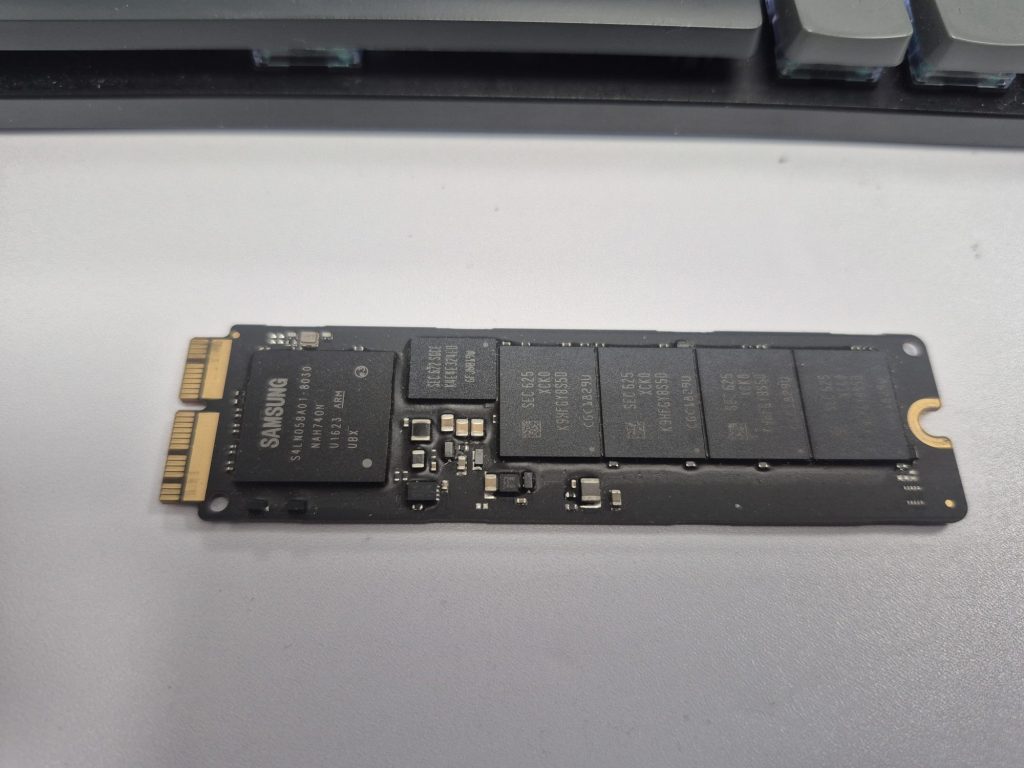
From there we checked recovery mode. The built-in recovery menu loaded fine, but the moment we tried to go further — connecting to Wi-Fi for internet recovery, or attempting system recovery — it threw an error and dropped back into the loop. At the time, we chalked this up to the age of the machine, since older MacBooks can be inconsistent with Apple’s recovery servers.

Next we tried a clean install from a bootable USB. Getting into the boot picker worked without issue, and selecting the USB drive was seamless. But once the install began, the same failure returned — Apple logo, loading bar, and right around the 80% mark, the machine powered off and restarted into the same loop. At that point, SSD and macOS corruption were both effectively ruled out, and a logic board fault started to look like the most likely explanation.

The Battery Clue We Almost Missed
Before writing this off as a logic board repair, we ran the MacBook’s built-in hardware diagnostics. Every component passed except the battery, which flagged as faulty. On its own, that’s not unusual — plenty of MacBooks boot and run just fine with a dead or even fully disconnected battery, as long as the charger is connected. We’ve serviced other A1398 units with the battery completely removed and had zero booting issues. So a failing battery reading didn’t initially register as the root cause.
What changed our minds was a forum thread describing the identical symptom on the identical model. Another technician had gone through nearly the same process — swapped drives, checked voltages against a known-good board — and landed at the same dead end. A commenter on that thread mentioned that this particular model needed a functioning battery to boot at all, something the original poster confirmed by testing two additional units of the same model. All of them booted normally once a working battery was installed.
The Fix: A New Battery Solved It
We ordered a replacement battery, installed it, and powered the machine on. It booted straight through, without a single restart. We logged into the customer’s account, ran through functional testing, and confirmed everything — storage, macOS, peripherals — was working exactly as expected. A part that, on almost every other Mac laptop we service, is optional for basic booting turned out to be the entire problem here.
A Quirk Specific to the A1398 EMC 2910 — And How to Diagnose It
We want to be clear about scope: this behavior is specific to the A1398 EMC 2910. We haven’t seen it on any other MacBook model or even other A1398 EMC revisions, and it goes against the general rule we — and most techs — rely on, where the charger alone is enough to power the board regardless of battery condition. We’ve serviced plenty of other A1398 units that boot fine with the battery completely dead or removed. This specific EMC 2910 configuration is the exception.
We don’t have a confirmed technical explanation for why the EMC 2910 board needs a working battery present to complete a boot. Apple hasn’t published anything documenting this as expected behavior, and we haven’t found a clear engineering explanation from teardown or schematic sources either. What we do have is repeatable, independently confirmed evidence: multiple units, multiple technicians, same symptom, same fix. Until a better explanation surfaces, we’re treating this as a known quirk of this specific board revision rather than a documented feature — and we think it’s worth having documented somewhere, since we couldn’t find it written up anywhere else.
If you’re staring at an A1398 EMC 2910 stuck in the same Apple-logo-then-restart loop, here’s the order we’d recommend checking things, based on what actually narrowed this down for us:
- Confirm the exact model and EMC number (Apple menu, or the sticker on the bottom case) — this quirk appears tied specifically to the EMC 2910 board revision, not the A1398 line as a whole.
- Swap in a known-good test SSD before assuming the drive is bad. If the loop persists with a different drive, the storage device isn’t the cause.
- Try recovery mode and a bootable USB install. If both fail at a consistent point in the process, that points away from a simple macOS corruption issue.
- Run Apple’s built-in hardware diagnostics (hold D at startup, or the relevant key combo for your model) before condemning the logic board. A failing battery reading here is easy to dismiss — don’t dismiss it on this model.
- If the machine passes diagnostics apart from the battery, that’s a good sign, not a bad one. On the EMC 2910, a clean diagnostic result outside of the battery generally means there’s no other blaring hardware issue at play — the board, storage, and other components are most likely fine.
- Replace the battery before quoting a logic board repair. On this specific model, it may be the difference between a full boot and an endless loop, not just a battery-life convenience.
What We Took Away From This One
Honestly, this repair just caught us off guard. We’ve worked on plenty of A1398s over the years and never once needed to think twice about the battery — dead, removed, doesn’t matter, they boot. So going in, we were expecting a storage issue, then figured it was heading toward a logic board replacement, and the actual fix ended up being the cheapest part in the machine.
We’re not claiming this applies to every A1398 or every MacBook out there — this is specific to what we saw on the EMC 2910, backed up by a couple of other techs online who ran into the same thing. If you’re working on this exact model and hitting this exact symptom, we just wanted to put our findings out there in case it saves you a few hours of chasing the wrong part, like it cost us.
Dealing with an A1398 EMC 2910 stuck in this exact loop? We’ve already done the troubleshooting so you don’t have to. Bring it by the shop located in Downtown, Los Angeles or give us a call and we’ll get it sorted.

