

If you’ve ever dug into your phone or laptop’s battery settings, you’ve probably seen a number labeled “cycle count” and wondered what it actually tells you. Is 300 bad? Is 800 a death sentence? Should you panic and book a replacement today?
Short answer: probably not yet. But let’s break down what this number really means, why it matters more than your battery’s age, and the honest signs that tell you it’s actually time to replace — not just what a marketing page wants you to believe.
What Is a Battery Cycle Count?
A charge cycle isn’t the same as “plugging in your phone.” One full cycle happens when you’ve used a total of 100% of your battery’s capacity — but that 100% can be spread across multiple charges.
For example:
- Charging from 50% to 100%, using it down to 50% again, then charging back to 100% = one full cycle
- Charging from 20% to 100% twice = also close to one full cycle (80% + 80% = 160%, so more like 1.6 cycles)
This is why plugging your phone in for a quick top-up throughout the day doesn’t rack up cycles nearly as fast as people assume. Your battery isn’t counting how many times you plug in — it’s tracking total capacity used over time.
What Actually Speeds Up Cycle Accumulation (and Battery Wear)
Not all charging habits are created equal. A few things influence how fast your battery burns through its rated cycle life — and how much capacity it loses along the way:
- Deep discharges. Regularly running your battery down to 0% before charging puts more stress on the cells than topping up from 50% or 60%. Shallow, frequent charges are is better for limiting battery wear than full drain-and-refill cycles.
- Heat. Temperature is one of the biggest factors in long-term battery aging — more so than cycle count itself. Leaving a phone in a hot car, gaming on a laptop while it’s plugged in and running hot, or charging in direct sunlight all accelerate chemical wear on the battery.
- Staying at 100% for long stretches. Keeping a device plugged in and fully charged for extended periods (like overnight, every night) adds voltage stress. This is why many phones and laptops now offer “optimized charging” or “battery care” modes that cap charging around 80-90% until you actually need full power.
None of this means you need to babysit your charging habits obsessively. But if you’re trying to stretch a battery’s useful life as long as possible — especially on a device you’re not ready to replace — keeping it roughly between 20% and 80% charge and out of the heat makes a real difference over time.
Why Cycle Count Matters More Than Battery Age
A battery that’s 3 years old but only has 200 cycles (light, occasional use) will almost always outperform a 1-year-old battery with 600 cycles (heavy daily use, frequent full discharges).
That’s because every lithium-ion battery is rated for a certain number of cycles before its capacity noticeably drops. Manufacturers typically design batteries to retain:
| Device Type | Rated Cycle Life | Capacity Retained at End of Rated Life |
| iPhone 14 & earlier | ~500 cycles | ~80% |
| iPhone 15 & later | ~1,000 cycles | ~80% |
| Android phones | ~500 cycles (varies by brand) | ~80% |
| Laptops | 300–1,000 cycles (varies widely by brand/battery) | ~80% |
| Tablets | ~500–1,000 cycles | ~80% |
These numbers are conservative estimates from manufacturers, not hard cutoffs. Plenty of batteries keep working fine past their rated cycle life — they just hold less charge than they used to.
How to Check Your Cycle Count
iPhone: Settings > Battery > Battery Health & Charging shows your “Maximum Capacity” percentage on every model. If you have an iPhone 15 or later, this same screen also lists the exact Cycle Count. On iPhone 14 and earlier, cycle count isn’t shown in Settings — we can pull that number for you in-store with diagnostic tools in about two minutes.
Android: Varies by manufacturer. Some (like Samsung) show battery health under Settings > Battery > More Battery Settings. Many Android devices don’t expose cycle count natively — dialer codes or third-party apps can sometimes surface it, but we’d rather run an accurate diagnostic than have you guess from an app of unknown reliability.
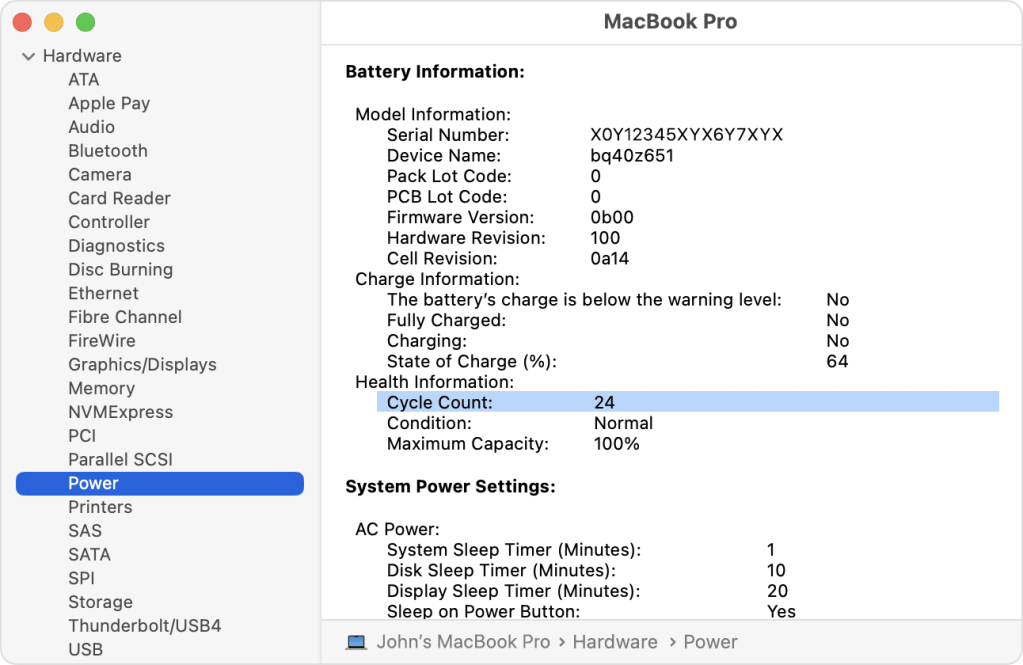
MacBook: Apple menu > About This Mac > System Report > Power — look for “Cycle Count” listed directly.
Windows Laptop: Run a battery report via Command Prompt (powercfg /batteryreport) — this generates an HTML file with charge cycle data and capacity history.
The Real Signs You Need a Replacement
Cycle count is one data point — it’s not the whole story. Here’s what we actually look at when a customer brings in a device:
- Battery health below 80% — this is the industry-standard threshold where most people start noticing real-world slowdown or unexpected shutdowns.
- Rapid, unexpected battery drain even with normal use.
- Device shutting off at 20-30% battery when it used to make it to 5%.
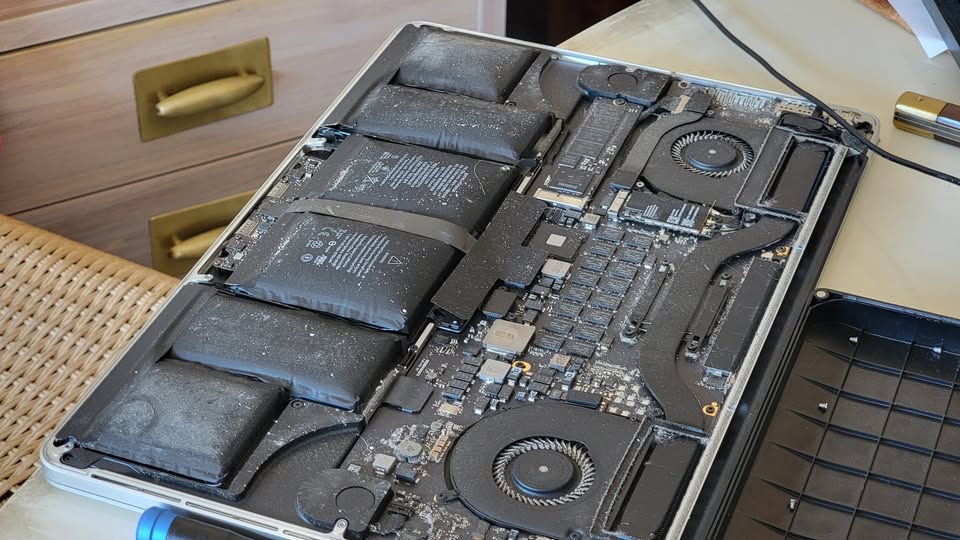
- Swelling — if your battery looks puffy or your screen/back panel is lifting, stop using it and bring it in immediately. This is a safety issue, not just a performance one.
- Overheating during normal charging or light use.
- Charging that won’t hold — device dies within an hour or two of “full” charge.
If you’re seeing two or more of these, it’s worth a battery health check regardless of what the cycle count says.
What We Won’t Do
We’re not going to tell you to replace a battery just because it crossed 500 cycles if it’s still holding 88% capacity and you’re not noticing any issues. Cycle count ratings are conservative by design — manufacturers build in a buffer. A lot of devices run perfectly fine well past their “rated” cycle life.
Our approach: we run the diagnostic, show you the actual numbers, and let you decide based on how the device is performing for you — not based on a number.
Battery Replacement vs. New Device: How to Think About It
This is usually the real question underneath “should I replace my battery” — and it’s worth separating from the cycle count conversation entirely.
A battery replacement almost always costs a fraction of a new device, and if everything else about your phone or laptop is working well (screen, performance, storage, camera), a new battery can genuinely make it feel new again. We see this constantly: someone comes in convinced their device is “just old” when really it’s one worn-out battery that’s causing all the issues.
That said, a battery swap isn’t the right call in every situation. It’s worth thinking twice if:
- Your device is already several generations behind and missing security updates
- You’re also dealing with other hardware issues (cracked screen, failing charging port, slow performance unrelated to battery)
- The repair cost approaches a meaningful chunk of a replacement device’s price
We’ll always tell you honestly which situation you’re in. If a battery replacement will genuinely extend the life of a device that’s otherwise solid, we’ll say so. If your money is better spent elsewhere, we’ll say that too.
Bottom Line
Cycle count is a useful reference point, not a countdown timer. What actually matters is:
- Your current battery health percentage
- Whether your device is showing real symptoms of battery wear
- How much that wear is actually affecting your daily use
If you’re not sure where your device stands, bring it in — we’ll do a diagnostic, show you the numbers, and give you a straight answer on whether a replacement makes sense right now or can wait.
Have questions about your specific device’s battery health? Stop by the shop in Downtown, Los Angeles or give us a call — we’re happy to help or answer questions, no appointment needed.
FAQ
Does fast charging damage my battery faster?
Occasional fast charging is fine for most modern devices, which have built-in safeguards against overheating. Relying on it exclusively, especially in warm environments, can accelerate wear slightly faster than standard charging speeds over hundreds of cycles.
Should I let my battery fully drain before charging?
No — this is outdated advice from older nickel-based batteries. Lithium-ion batteries (used in virtually all modern phones and laptops) actually prefer shallow, frequent charges over deep discharges.
Can I replace a battery myself?
Some devices allow it, but many modern phones and laptops use adhesive-mounted batteries that require specific tools and care to remove safely — especially to avoid puncturing the battery, which can be a fire hazard. We’re happy to walk you through what your specific device involves.
Does a battery health percentage below 80% mean it’s unsafe?
Not necessarily — low capacity mostly just means shorter battery life between charges. Safety concerns come from separate signs like swelling, overheating, or unexpected shutdowns, which we’d flag regardless of the percentage.

