

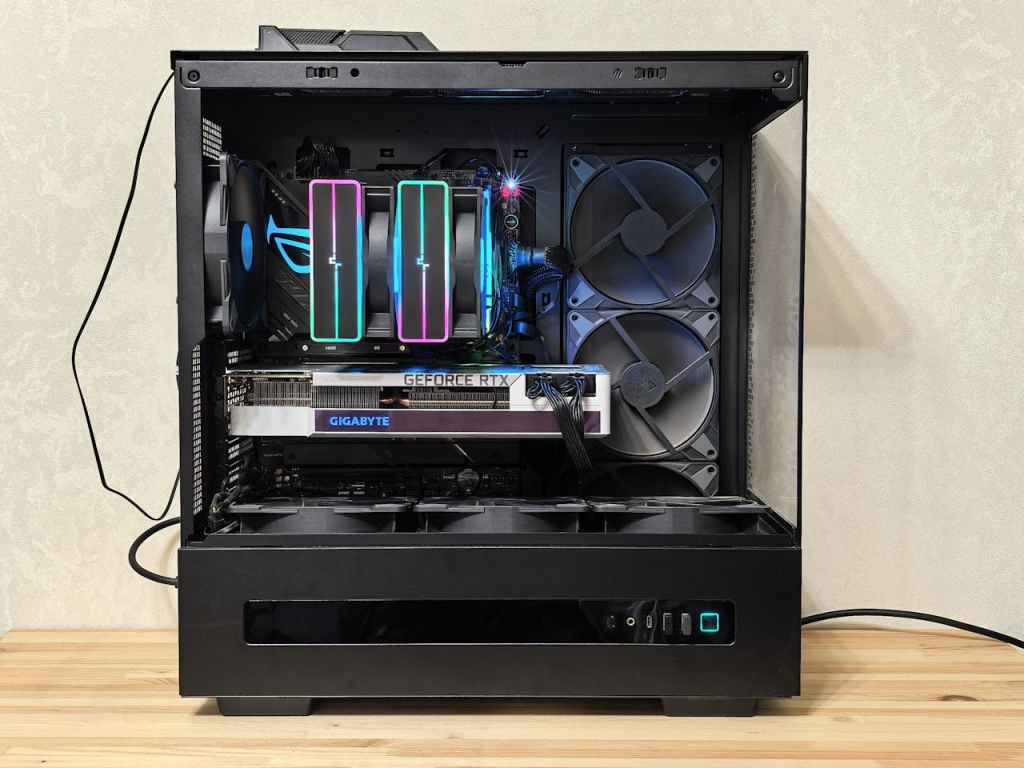
A lot of customers have been asking me lately: “Is now a good time to build a PC?” And honestly, it’s one of the most loaded questions I’ve gotten in years. Not because the answer is complicated—but because 2026 has thrown some genuinely unusual curveballs at the PC hardware market that most buyers don’t know about.
As someone who has built and repaired hundreds of PCs for clients right here in Los Angeles, I try to stay ahead of market trends so I can give some good advice. Right now, there are three major forces reshaping the cost and timing of a custom PC build in 2026: lack luster GPU generations, import tariffs, and shifting component availability. Let’s break it all down.
This isn’t a “custom vs. prebuilt” debate—we’ve covered that separately. This is specifically about timing. If you’ve already decided you want to build, should you do it now or wait? And if you’re on the fence, what does the current market actually look like for someone trying to put together a build today?
The Tariff Problem Nobody Is Talking About
Here’s something that doesn’t get enough attention in the PC building community right now: import tariffs are still hitting PC components hard in 2026. A significant portion of PC hardware—GPUs, motherboards, power supplies, cases—is manufactured in countries now subject to elevated U.S. tariffs. What that means for you as a builder is simple: prices have gone up, and they haven’t come back down yet.
I’ve had customers come in with PCPartPicker lists they put together six months ago, only to find the same build costs $200–$400 more today. That’s not just inflation—that’s tariff pressure moving through the supply chain. It’s real, and it’s something to plan around rather than ignore.
The honest advice I give my customers: if you can hold off until some big holiday like Black Friday or Christmas, there’s a reasonable chance that sales and component bundles will appear and this can greatly reduce overall cost. But if you need a machine now, don’t let perfect be the enemy of good—there are still solid builds to be had at every price point if you know where to look.
New GPU Generations: Good News With a Catch
On the bright side, 2025 brought us fresh GPU generations from both NVIDIA and AMD, which means the previous generation cards are finally starting to drop in price. That can be great timing for a builder—but the catch is that the new cards themselves are priced higher than their predecessors were at launch, partly because of those same tariffs and AI.
So where does that leave you as a builder in mid-2026? Here’s the breakdown by tier:
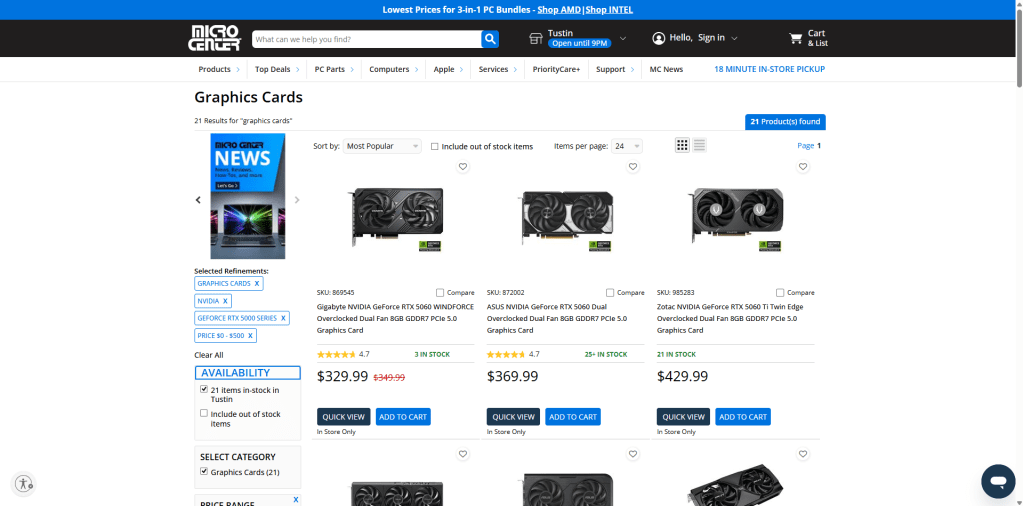
- Budget tier (under $500 GPU): Last-gen mid-range cards have come down enough that this is actually the sweet spot right now. You’re getting cards that were $600–$750 a year ago for significantly less. Good value if you’re not chasing cutting-edge performance.
- Mid-to-high tier ($600–$1000+ GPU): This is the most confusing space right now. New cards in this range are available, but tariff/AI -inflated pricing means some of them are priced where they don’t match their actual performance jump over last gen. Suggestions for this category is very subjective to the users use case so it is best to determine what the PC will be used for first before deciding on a GPU in this caliber.
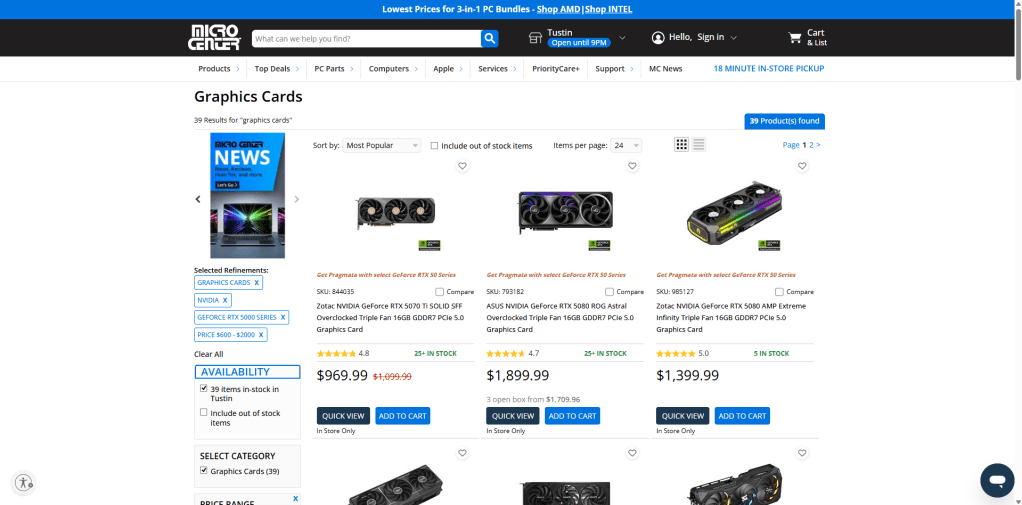
The bottom line on GPUs in 2026: the market is volatile. That’s not necessarily bad news—it means there are deals to be found on previous-gen cards—but it does require more research than usual before you pull the trigger.
What About the Rest of the Build? CPUs, RAM, and Storage in 2026
Here’s where I have to be straight with you, because a lot of PC build guides right now are glossing over this: it’s not just GPUs that have gotten expensive. The rest of your build has taken a hit too, and the reason most people don’t realize it is because the culprit isn’t tariffs or gaming demand—it’s AI data centers. That said, CPUs from both Intel and AMD are still competitively priced and relatively unaffected—the AM5 platform from AMD in particular remains a strong long-term value since that socket has more upgrade runway ahead of it.
RAM and storage, however, are a different story. The explosive growth of AI infrastructure has created massive demand for the same memory and flash storage chips used in consumer PC components. Cloud providers and data center operators are buying up DRAM and NAND flash at a scale that has genuinely squeezed the consumer market. The result: DDR5 RAM and NVMe SSDs are sitting at prices that are roughly double to triple what they were just a year ago. A 32GB DDR5 kit that used to be a straightforward $120–$150 purchase is now pushing $280–$380 depending on speed and brand. 1TB NVMe SSDs that once felt like a steal at $80–$100 are back up in the $160–$200 range. It’s frustrating, and it’s a part of your build budget you need to account for.
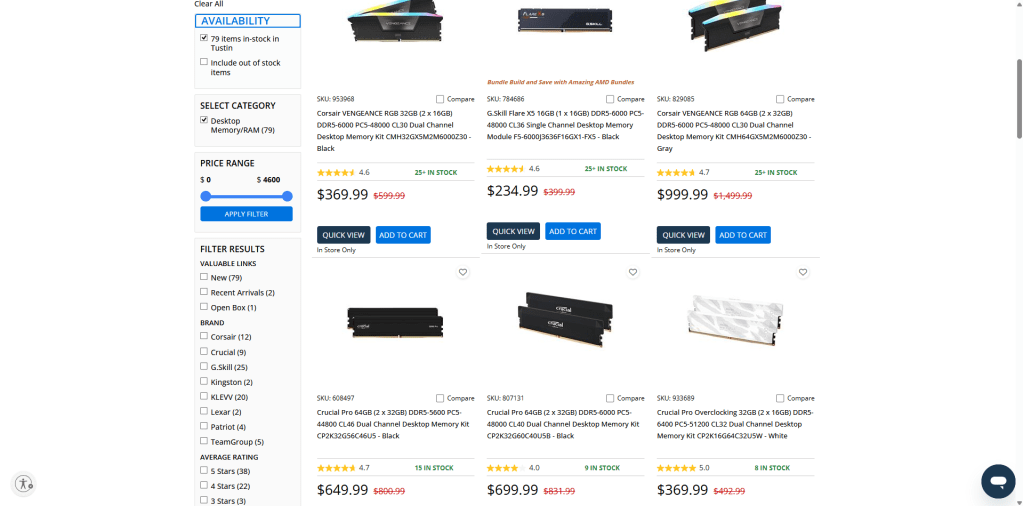
The practical takeaway here is to not underestimate your RAM and storage budget when planning your build. A lot of customers come in with a parts list that priced out RAM and SSDs based on what they saw six months or a year ago and are caught off guard at checkout. The AI data center boom shows no signs of cooling off, so these prices are unlikely to drop significantly in the near term. Build that reality into your budget from the start rather than treating memory and storage as an afterthought.
So, Should You Build Right Now or Wait?
Here’s my honest, shop-owner answer based on what I’m seeing with customers right now. It comes down to your situation:
- Build now if… you have an immediate need (your current machine is failing or can’t run what you need), your GPU budget is in the budget-to-mid range where last-gen cards have dropped in price, or you’re building a workstation where the CPU and RAM matter more than a top-tier GPU.
- Consider waiting if… holiday sales are in the horizon. You can genuinely save hundreds of dollars during any holiday sales and with some stores creating PC component bundles that can jump start a build at a very affordable price, if you take advantage of these sales, then the money saved can be allocated to other components or just save money.
- Do the staged build if… you want to be strategic about the current market. Buy the CPU and motherboard now—those are well-priced. Budget realistically for RAM and storage since those have climbed significantly due to AI data center demand. Then hold off on the GPU until you decided on what the system will be used for (like gaming or creative work)
- Watch for used market deals if… you’re comfortable buying secondhand. New GPU launches push previous owners to upgrade and sell, which means the used GPU market tends to get a healthy influx of relatively recent cards at fair prices. Just make sure you’re buying from a reputable seller and ask if they can test the card before you purchase.
There’s no single right answer, but there is a right answer for your situation. The 2026 market is unusual enough that the default “just go build it” advice doesn’t cut it right now—timing genuinely matters more than it has in years.
Quick Checklist Before You Pull the Trigger
Before you finalize your parts list and hit order, run through these quickly:
- Look up the tariff status on your parts – Prices on sites like PCPartPicker reflect current tariff-adjusted costs. If a part seems higher than you expected based on older research, that’s likely why. Budget accordingly and don’t be surprised at checkout.
- Price out the non-GPU parts separately – CPUs and motherboards are still well-priced, but don’t assume the same about RAM and storage. AI data center demand has pushed memory and SSD prices up significantly over the past year. Price out your full build with current numbers—not estimates from older guides—before locking in your budget.
- Don’t forget power supply headroom – New GPU generations, especially at the high end, are drawing more power than ever. If you’re planning to upgrade your GPU later, make sure your PSU is rated high enough to handle what you might add. Buying a quality 850W–1000W unit now saves you from swapping it out in a year.
Final Thoughts: The 2026 Custom PC Market Is Unusual—Plan Accordingly
I’ve been building and repairing PCs long enough to know that no two years look the same. But 2026 genuinely stands out—tariffs have introduced pricing unpredictability we haven’t seen before, a GPU generation where AI’s computations are made by the GPU thus driving up cost, and AI data center demand has quietly pushed RAM and storage prices to levels that would have seemed unreasonable a year ago. That combination means the “just build it whenever” mindset isn’t serving buyers as well as it used to.
- The reality check: between tariffs, a lack luster GPU generation, and AI-driven RAM and SSD price increases, building a PC in 2026 costs more across the board than most online guides are admitting. Budget-tier GPUs are a genuine bright spot, and CPUs remain solid value. But go in with realistic numbers on memory and storage—your wallet will thank you for not being caught off guard.
- Custom building isn’t dead—it’s just asking more of you in 2026 than it has in recent years. Go in informed, set expectations on the GPU, and you’ll come out with a machine that’s worth every penny.
As always, if you have questions about what to buy, want a second opinion on your parts list, or just want to talk through your options, we’re here for it. That’s what we do.
Need Help With Your Computer?
If you’re in Los Angeles and have any questions, PC problems, or need computer repair, feel free to give us a call or stop by our shop. We’re here to help with everything from slow PCs to hardware repairs and upgrades.
 ITBrother