

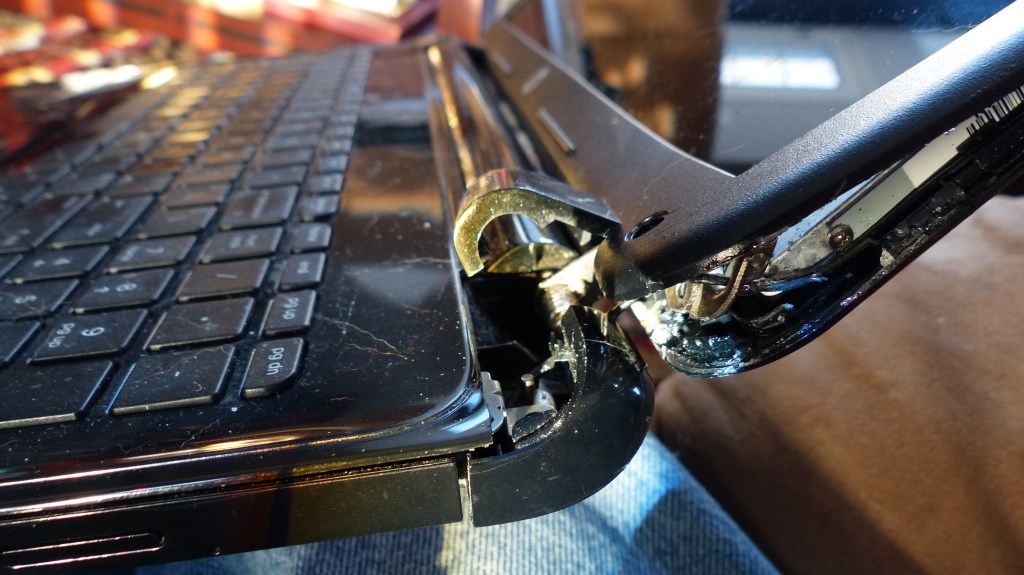
When people think about laptop issues, they often imagine problems like cracked screens, faulty hard drives, or malfunctioning operating systems. But one component that’s often overlooked is the laptop hinge — a small yet critical part of your system that keeps everything together.
Every laptop ever made uses a hinge mechanism to open and close the display. While the metal hinge itself is typically durable and built to last for years, the plastic housing or frame that holds it in place is far more fragile. Over time, that housing can weaken, crack, or even shatter — and once it does, your laptop could be at risk for much more serious (and expensive) damage.
Why Laptop Hinges Break
From my experience in the computer repair industry, I’ve seen countless laptops come in with broken or loose hinges. The hinge assembly is usually anchored to the laptop’s keyboard frame, bottom chassis, or display cover using small screws. These screws are fastened into thin plastic mounting points, which eventually become brittle from age, repeated use, and heat exposure.
Once that plastic breaks, the hinge has nothing solid to hold onto. Every time you open or close your laptop, the pressure transfers to nearby components — sometimes bending the screen, warping the frame, or even damaging the motherboard beneath it.
In other words, what starts as a small cosmetic issue can quickly spiral into a major structural or electronic failure.
Why You Shouldn’t Ignore a Broken Hinge
Many users treat hinge damage as a minor inconvenience. If the screen still opens and the computer still works, why bother fixing it? Unfortunately, that mindset often leads to far costlier repairs down the line.
When a hinge isn’t properly secured, every movement causes stress on surrounding components. The display cable (which runs through the hinge area) can get pinched or torn, leading to screen flickering or complete display failure. The case can start separating, allowing dust and debris to enter the internals. In more severe cases, the hinge mount can pull out parts of the chassis, damaging the motherboard or Wi-Fi antenna connections nearby.
Even though a broken hinge might not seem urgent, leaving it unaddressed can reduce your laptop’s lifespan dramatically — and what could have been a simple frame repair may turn into a full-screen or motherboard replacement.
Repair Options for a Broken Laptop Hinge
When it comes to hinge repair, there are typically two main approaches: proper part replacement or temporary reinforcement.
1. Full Replacement (Recommended)
The most reliable way to fix a broken hinge is to replace the entire part that holds the hinge in place. This could mean replacing the top screen cover (for newer ultrabooks), the keyboard frame (for modern laptops), or even the bottom chassis (for older models).
While this is usually the more expensive option upfront, it provides a long-term and factory-grade repair. Once replaced, the hinge will function as it was originally intended, with no added stress or instability. In most cases, replacing the damaged part once is far more cost-effective than attempting multiple temporary fixes over time.
2. Temporary Fixes (Not Recommended for Long-Term Use)
If part availability or budget is a concern, an alternative method is using epoxy or industrial-grade adhesive to reattach or reinforce the broken hinge mount.
However, this is not a perfect solution. Because the plastic is already weakened, the hinge area will likely crack again after continued use. Once that happens, technicians will have to remove the adhesive and replace the entire piece anyway — which increases both labor time and repair cost.
In short: temporary fixes might work for a while, but replacing the damaged frame or housing is the only way to ensure the hinge remains stable and safe for long-term use.
Signs Your Laptop Hinge is Failing
Recognizing the early signs of hinge damage can save you a lot of money and frustration. Here’s what to watch out for:
- Cracking or popping sounds when opening or closing the lid
- Visible gaps or separation near the hinge area
- Uneven resistance when moving the screen
- Warped or lifting plastic around the corners of the display or keyboard
- Screen flickering or image distortion when adjusting the lid
If you notice any of these symptoms, it’s best to stop forcing the lid open and take your laptop to a technician as soon as possible. The earlier you repair the hinge mount, the less likely you’ll damage the screen or internal components.
Why DIY Fixes Can Make Things Worse
It’s tempting to try fixing a broken hinge yourself, especially with so many “quick repair” videos online. I’ve seen customers use duct tape, glue, zip ties, or even screws drilled into the plastic casing. While these DIY methods might seem to hold things together, they often create new problems.
For instance, glue can seep into the hinge mechanism, making it stiff or immovable. Screws driven into the plastic in the wrong spots can damage internal wiring or prevent the lid from closing properly. And any excess adhesive will need to be carefully removed later, adding to repair time and cost.
So, while a DIY repair may appear to save money in the short term, it usually leads to more expensive professional repairs down the road.
The Cost of Waiting Too Long
Delaying hinge repair often turns a small issue into a big one. What starts as a $100–$150 hinge frame replacement can escalate into a $300+ screen replacement or worse — a total laptop replacement if the motherboard or display cable is damaged.
By addressing the issue early, you preserve not only the structural integrity of your device but also the safety of the screen and internal components. In short, fixing your hinge early saves your laptop — and your wallet.
Final Thoughts
Your laptop’s hinge might not seem like an essential component, but it plays a critical role in keeping your device stable, functional, and durable. Once it starts failing, the risk of collateral damage increases with every open and close of the lid.
If you notice any looseness, cracking sounds, or gaps near the hinge, don’t wait — get it inspected by a professional repair technician. Acting early ensures a cheaper, cleaner repair and helps extend the overall lifespan of your computer.
Need Help With a Broken Hinge?
If you’re in Los Angeles and dealing with a loose or broken laptop hinge, we can help. Whether it’s replacing the hinge frame, repairing cracked covers, or securing the internal mount, our repair shop provides fast, affordable, and professional laptop repair services.
 ITBrother
Leave a comment