


Scammers are getting really, really good at what they do. I see it firsthand at my shop — people come in after clicking a bad link or handing over information to someone on the phone who sounded completely legitimate. It’s not a matter of being gullible. These tricks are designed by professionals to fool everyday people.
The good news? Once you know what to look for, they’re a lot easier to catch. This guide is written for anyone — no tech background required.
First, What Is a Scam Email (“Phishing”)?
“Phishing” (pronounced fishing) is when a scammer sends you a fake email pretending to be someone you trust — like your bank, Amazon, Google, PayPal, or even the IRS.
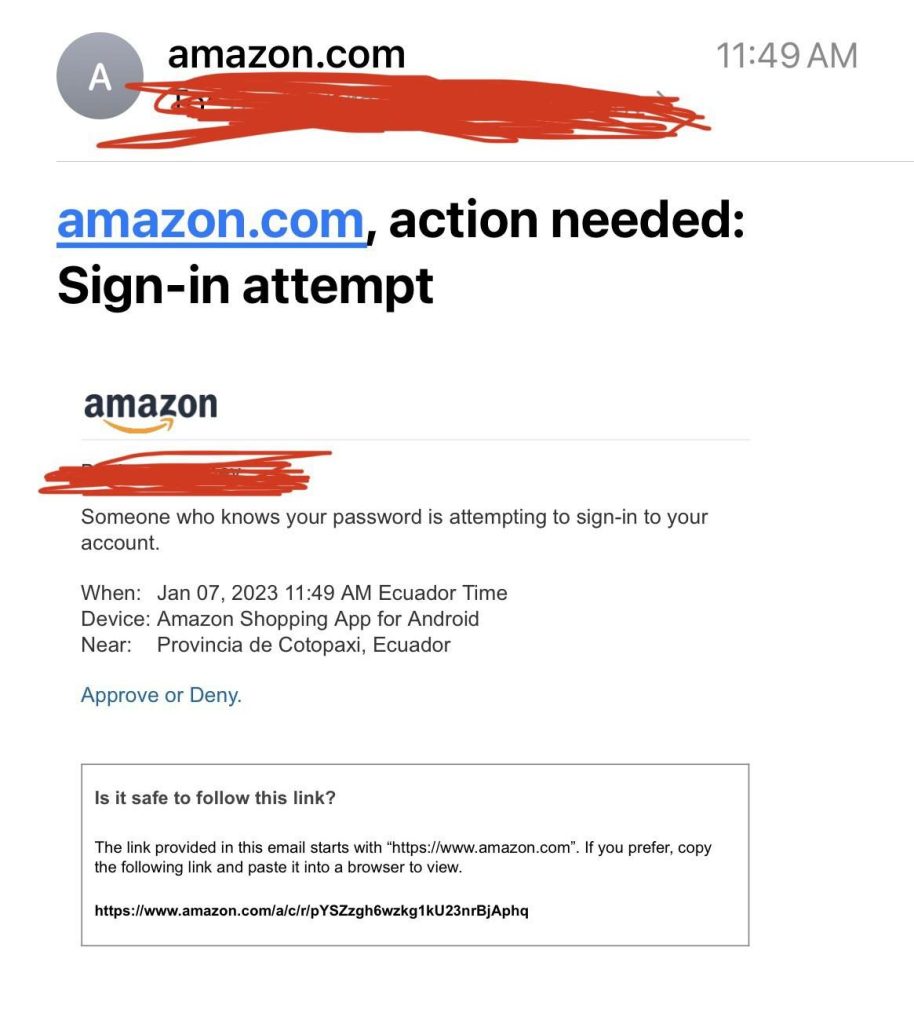
The goal is to get you to click a link or give up personal information like passwords, your Social Security number, or credit card details. Years ago, these emails were pretty obvious. Now? They can look identical to the real thing.
5 Warning Signs in a Scam Email
1. It’s trying to scare you or create urgency
Scam emails love phrases like:
- “Your account has been compromised.”
- “We detected suspicious activity.”
- “You must act now or your account will be closed.”
This is done on purpose. When you panic, you stop thinking clearly. Take a breath. A real company will give you time to verify things.
2. The email address looks “almost” right
This is one of the easiest giveaways — but only if you actually look. A scam email might come from:
- support@googl-security.com (not google.com)
- noreply@amazon-support.net (not amazon.com)
- alerts@paypa1.com (that’s a number 1, not an L)
Always look at the part after the @ symbol. If it doesn’t exactly match the company’s real website, delete the email.
3. Something looks “off” about it
Scammers copy the look of real emails, but they don’t always get it perfectly right. Watch for:
- Spelling mistakes or bad grammar
- Generic greetings like “Dear Customer” instead of your name
- Blurry logos or strange formatting
- Links that don’t match the company name when you hover over them
Trust your gut. If something feels off, it probably is.
4. There’s a suspicious link
The link in a scam email usually leads to a fake website designed to look real. Before clicking anything:
- On a computer: hover your mouse over the link without clicking. A preview of the real address will appear at the bottom of your screen.
- On your phone: press and hold the link to see where it actually goes.
If you’re unsure, don’t click it at all. Go directly to the company’s website by typing the address yourself in your browser.
5. It only contacted you one way
Real companies — especially banks — don’t rely on just one email to tell you something serious. If your bank suspects fraud, they’ll usually call you, send a text, show a notification in their app, AND email you. If you only got one email with no other follow-up, be skeptical.
4 Warning Signs of a Scam Phone Call
Phone scams can feel even more stressful because you’re put on the spot. Here’s what to watch for:
1. They’re vague about the details
A scammer might say something like “There’s a legal claim filed against you” or “Your Social Security number has been suspended” — but they can’t give you an actual case number, date, or specific amount. Real agencies and companies always have specific details. If they can’t back it up, hang up.
2. They use your personal information to seem legit
You might be surprised when a caller says your name, your address, or even a relative’s name. Don’t be fooled. A lot of this information is already public or was leaked in a data breach. Scammers collect it to sound more convincing. Knowing your name doesn’t mean they’re legitimate.
3. The voice sounds robotic or unnatural
Many scam calls are now fully automated or generated with AI. If the voice sounds flat, slightly off, or like a recording — it might be. Even AI-generated voices that sound human can have unnatural pauses or a strange rhythm. If anything feels off about how they’re speaking, trust that feeling.
4. They pressure you to stay on the line or act immediately
Legitimate companies will always let you hang up, call back, or verify through their official website. Scammers don’t want you to do that. If someone tells you “Don’t hang up” or pressures you to decide right now — that’s your cue to end the call.
What To Do If You Get One
- Don’t click links in the email. If you need to log in somewhere, type the website address yourself.
- Don’t give out personal information. Your bank, the IRS, and Social Security will never ask for your password, SSN, or card number via an unsolicited email or call.
- Hang up or delete. You don’t owe a scammer your time. Hang up without explanation.
- Report it. You can report phishing emails through your email app (look for “Report Spam” or “Report Phishing”). You can also report scam calls to the FTC at reportfraud.ftc.gov.
- Block the number or sender. It won’t stop all attempts, but it helps.
Simple Steps to Protect Yourself Going Forward
- Turn on two-step verification (2FA): This means even if someone gets your password, they still can’t log in without a second code sent to your phone.
- Use a password manager: Apps like Bitwarden or 1Password help you use different passwords for every account so one breach doesn’t open everything.
- Talk to your family about this: Older relatives are often targeted. Sharing what you’ve read here could genuinely protect them.
Bottom Line
Scammers are professionals. They study human behavior and know exactly how to make you panic, trust, or rush. But they also have patterns — and now you know what those patterns look like.
The most important thing you can do is slow down. If something feels off, stop. Don’t click, don’t call back, don’t give out any information. Take five minutes to verify through official channels.
And if you’re ever unsure whether a device has been compromised or you’ve accidentally clicked something suspicious — bring it to our shop in Downtown, Los Angeles. We’re happy to take a look and give you peace of mind.
