

As an IT professional with years of experience in tech support and cybersecurity, I’m still surprised by how many people fall victim to fake tech support scams. It usually starts with someone saying, “I got a call from Microsoft tech support and let them into my computer.”
If you’re not tech-savvy or unfamiliar with how legitimate tech support works, this kind of scam can be easy to fall for. But once a scammer gains remote access to your computer, the damage can happen fast—and it’s often hard to undo. These scammers install malware, steal personal data, grab your IP address, and may even drain your bank account or credit card.
To protect yourself and others, here are the most common warning signs of fake tech support scams and how to respond safely.
1. Microsoft Will Never Call You or Offer Remote Desktop Support
If someone calls and claims to be from Microsoft tech support, that’s your first red flag. Microsoft does not make unsolicited tech support calls. They will not ask to connect to your PC, and they will never offer remote desktop services unless you reached out through official channels.
Why not? Because with millions of users worldwide, it’s impossible for Microsoft to offer 1-on-1 support to every user. Instead, they provide help through their official Microsoft Support website and community forums.
2. Watch Out for Overseas “Tech Support” Calls
A common stereotype in these scams involves scammers with heavy foreign accents, often from South Asia or the Middle East, claiming to represent companies like Norton, McAfee, or even Amazon tech support. To be clear: Not all foreign-based support is fraudulent. I’ve worked with many skilled tech professionals from overseas.
However, the scammers usually:
- Operate from call centers located outside the U.S.
- Use fake caller ID spoofing
- Follow a script designed to trick you into thinking your system is infected
They often claim your system has a virus and ask you to download tools like AnyDesk, TeamViewer, or GoToAssist—legitimate software that they misuse to gain full control of your device.
Once connected, they might:
- Run fake virus scans
- Browse random folders to “look busy”
- Steal personal data
- Inject malware or remote access trojans (RATs)
- Demand payment via gift cards, bank info, or wire transfers
3. Fake Virus Pop-Ups on Your Browser
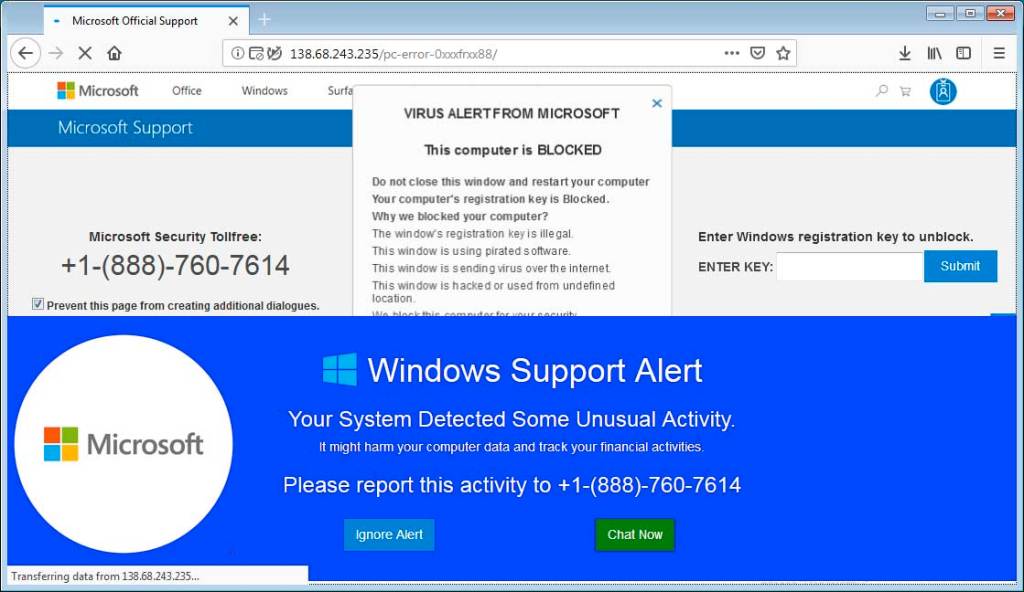
Most tech support scams begin not with a phone call, but with a fake virus warning pop-up in your browser. These are designed to look urgent and frightening, often using the logos of real antivirus companies like McAfee, Norton, or Windows Defender.
These pop-ups may say:
- “Your system is infected with 5 viruses!”
- “Do not close this window. Call Microsoft support immediately!”
- “Your computer has been locked due to a security issue.”
But these are not legitimate antivirus alerts. They are fake web pages using basic JavaScript and adware tactics.
You’ll know it’s fake if:
- The warning comes from your browser, not your antivirus software
- You don’t actually use the antivirus brand mentioned in the pop-up
- The alert includes a phone number to call (legitimate software will never do this)
Never call the number or click on anything in the pop-up.
Instead:
- Close the browser using Task Manager (Ctrl+Shift+Esc)
- Run a full system scan with a real antivirus tool like Windows Security, Malwarebytes, or Bitdefender
- Clear your browser cache and reset browser settings if needed
Final Reminder: No Big Tech Company Will Offer Remote Desktop Help
Let this sink in:
No big tech company—Microsoft, Apple, Norton, McAfee, or Amazon—will ever call you, email you, or display a pop-up offering remote tech support.
- They don’t monitor your personal devices.
- They don’t track your system for infections.
- They do not provide unsolicited remote access support—ever.
If someone reaches out saying otherwise, it’s a scam. If a pop-up tells you to call support, it’s fake. Giving someone remote access to your computer can expose you to identity theft, financial fraud, and long-term system compromise.
If you want to know more about fake tech support scams check out this article by the Federal Trade Commission.
How to Stay Safe From Tech Support Scams
- Never give remote access to someone who calls you or contacts you unexpectedly.
- Use trusted antivirus software and keep it up to date.
- Don’t rely on pop-ups for system health information—only trust verified antivirus tools.
- Talk to a local IT technician or a trusted tech support provider if you’re unsure.
- Educate family members, especially older adults, about how these scams work.
- Bookmark official support sites and use them if you truly need help.
If you’ve fallen for one of these scams, act fast:
- Disconnect your computer from the internet
- Change all your passwords using a clean device
- Contact your bank and report suspicious activity
- Reach out to a local professional for malware removal
 ITBrother
Leave a comment