

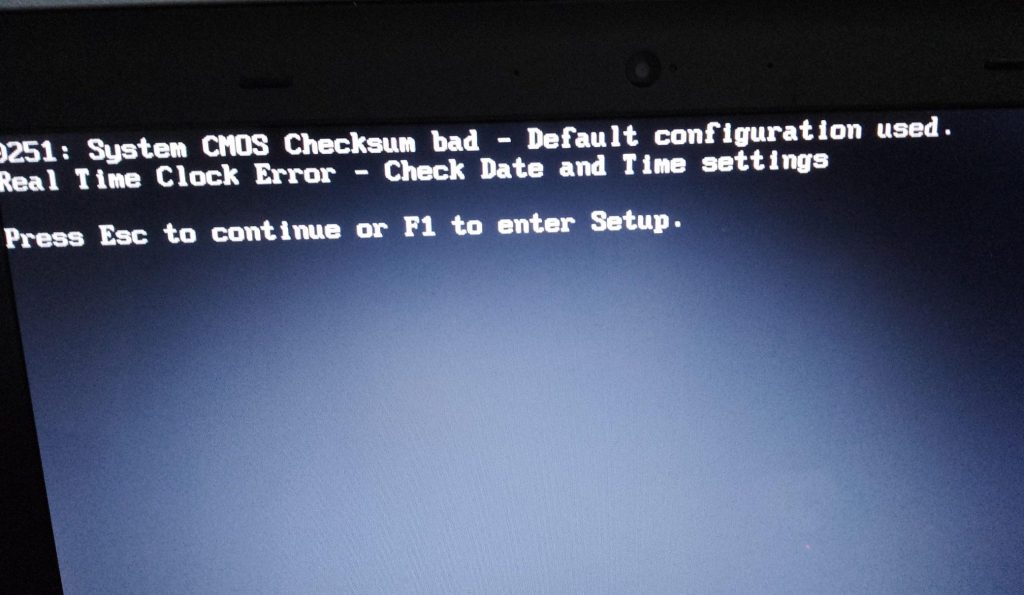
Seeing your computer’s date and time reset every time you turn it on can be confusing and, at first glance, concerning. You might be greeted with messages such as “System clock has been reset,” “Time and date not set,” or notice that Windows boots with an obviously incorrect time. In some cases, websites refuse to load correctly, security certificates fail, or applications behave unpredictably.
While this problem looks like it could be software-related, malware-related, or even a sign of a failing operating system, the reality is far simpler. In real-world repair scenarios, a system clock that keeps resetting is almost always caused by a single, well-understood hardware component reaching the end of its lifespan.
Why a Computer’s System Clock Resets Repeatedly
Computers rely on a tiny power source to keep track of time and system configuration when the machine is completely turned off. When that power source fails, the system forgets both the time and certain firmware settings the moment power is lost.
In most cases, the culprit is a failing CMOS battery.
This small battery powers the real-time clock (RTC) and preserves BIOS or UEFI settings when the computer is shut down and unplugged. Once the battery dies, the system can no longer retain this information, resulting in the clock resetting on every startup.
Common Symptoms of a Failing CMOS Battery
A resetting system clock rarely appears alone. Users often experience additional symptoms that point toward the same underlying issue.
These can include:
- The date and time resetting after every shutdown
- Repeated startup warnings about the system clock or CMOS settings
- BIOS or UEFI settings reverting to default values
- Boot order changes or hardware configuration resets
- Operating systems asking to reconfigure time settings frequently
These issues are particularly common on older desktops and laptops, especially systems that are five years old or more.
What the CMOS Battery Actually Does
Despite its small size, the CMOS battery plays an important role in system stability. Its primary purpose is not just to keep the clock running, but to ensure that firmware-level settings remain intact when the computer is powered off.
Specifically, it allows the system to remember:
- The correct date and time
- BIOS or UEFI configuration changes
- Hardware initialization parameters
- Boot device priorities
Because the CMOS chip and real-time clock consume very little power, these batteries can last a very long time. Under normal conditions, a CMOS battery can function reliably for five to eight years, sometimes longer depending on system usage and environmental factors.
Why Replacing the Battery Fixes the Problem
When the CMOS battery no longer provides sufficient voltage, the system loses its ability to retain stored firmware data. Each time the computer is powered off, that information is wiped, forcing the system to fall back to default values on the next startup.
Replacing the battery restores continuous power to the clock and configuration memory, allowing the system to retain settings again. Once replaced, the system clock should remain accurate, and BIOS settings should persist normally.
Fixing the Issue on Desktop Computers
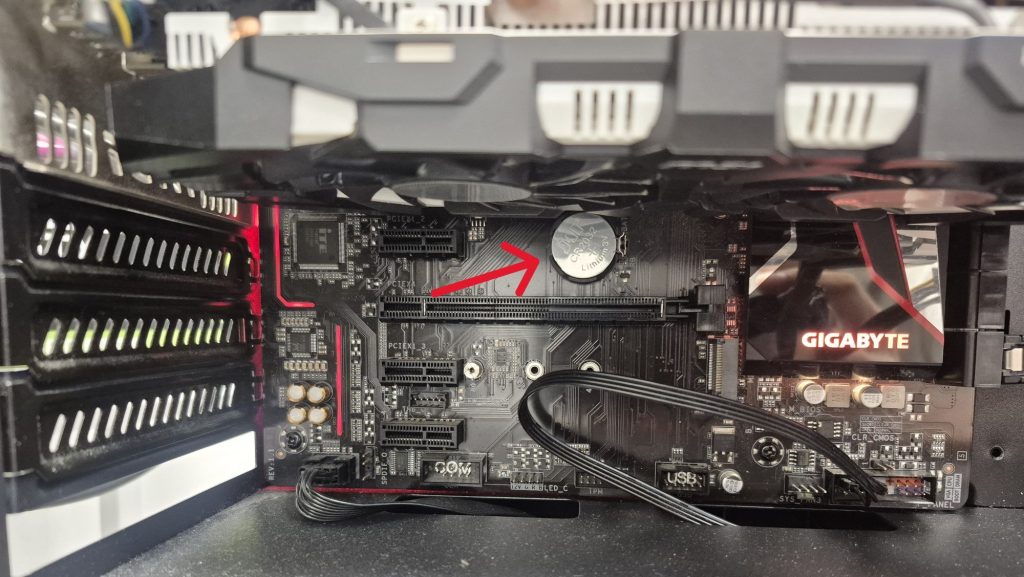
On desktop systems, replacing the CMOS battery is usually one of the simplest hardware repairs you can perform.
Most consumer and custom-built desktops use a standard CR2032 coin-cell battery, which is inexpensive and widely available. After powering off and unplugging the system, the battery can typically be accessed by removing the side panel.
Motherboard layouts vary, but the battery is often located near the PCIe slots or chipset area. Once replaced, the system may prompt you to set the correct time and confirm BIOS settings during the next boot.
Prebuilt systems from manufacturers such as Dell, HP, Acer, or Lenovo sometimes use proprietary layouts. While many still rely on a standard coin cell, others use a wired battery pack connected to the motherboard. These replacements are still affordable, though slightly more involved to access.
How Laptops Handle System Clock Power
Laptops introduce more variation in how the real-time clock is powered.
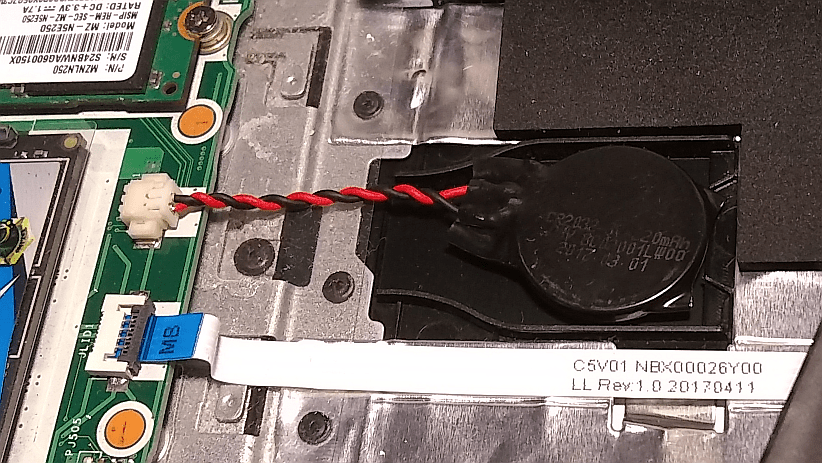
Older laptop models often include a separate CMOS battery, usually wrapped in protective material and connected by a small cable. Accessing it typically requires partial disassembly of the system, making the repair more delicate than on a desktop.
Some manufacturers use proprietary battery shapes or connectors, but replacements are generally available through parts suppliers.
Do Newer Laptops Still Use CMOS Batteries?
Many modern laptops no longer include a dedicated CMOS battery at all. Instead, they use the main laptop battery to power the real-time clock and firmware memory.
This design simplifies motherboard layouts and reduces component count, but it changes how clock issues present themselves. On these systems, a completely depleted or failing main battery can cause the system clock to reset once power is fully lost.
In practice, this means the battery itself usually fails long before a clock reset becomes noticeable. Replacing the main battery resolves both issues at once, making standalone clock errors much less common on newer laptops.
Are There Other Possible Causes?
While it is theoretically possible for motherboard damage or firmware corruption to affect timekeeping, these cases are exceedingly rare. In practical repair experience, a persistent system clock reset is almost never caused by malware, Windows updates, or software misconfiguration.
If the clock only drifts slightly over time, that may point to time synchronization issues. However, a full reset after shutdown strongly indicates a power retention problem rather than a software one.
When Should You Replace the Battery?
You should consider replacing the CMOS battery if your system meets any of the following conditions:
- The computer is more than five years old
- The date and time reset after being powered off
- BIOS or UEFI settings refuse to save
- Startup warnings about the system clock appear repeatedly
Replacing the battery is inexpensive and can prevent additional problems related to boot failures or incorrect system configuration.
Final Thoughts
A system clock that keeps resetting may look like a serious fault, but it is usually one of the most straightforward hardware issues to diagnose and fix. In most cases, a simple battery replacement restores normal behavior and prevents future startup problems.
If you’re unsure which battery your system uses or whether disassembly is required, a qualified technician can confirm the cause quickly. Addressing the issue early helps maintain system stability and avoids unnecessary troubleshooting of unrelated software problems.
 ITBrother
Leave a comment