

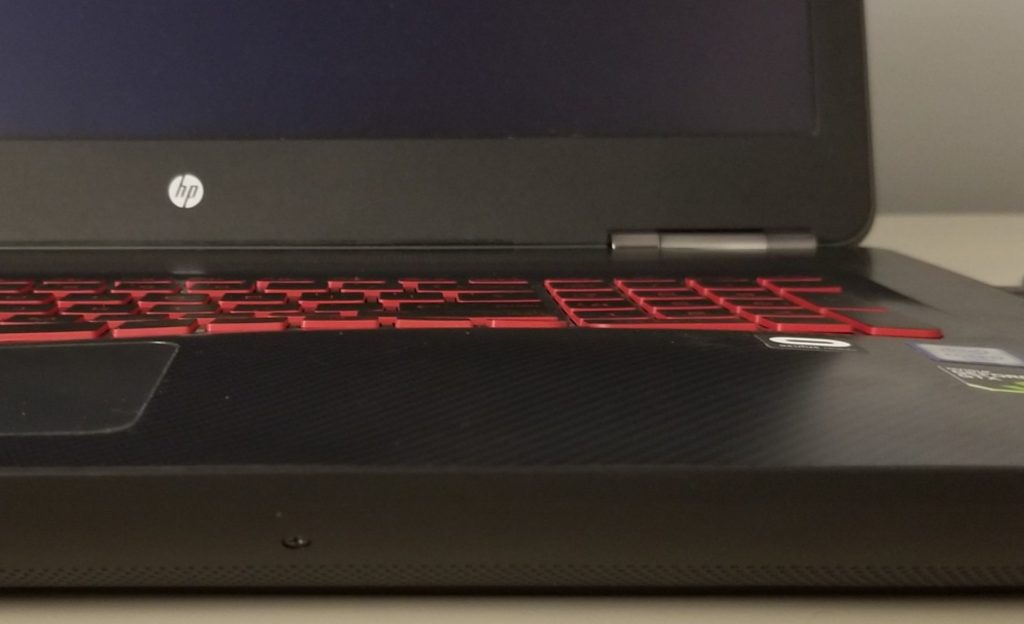
One of the most common hardware issues we see in the shop is a laptop base that has slightly warped or lifted due to battery expansion. While this may look like a cosmetic problem at first, it is almost always a sign of a swollen lithium-ion battery inside the device. This is not a minor issue. It is a safety concern and a hardware integrity issue that should be addressed immediately.
Many people are surprised when they learn that laptop batteries can physically expand. In the repair and IT field, this is well-known behavior of aging or failing lithium-ion batteries. But for everyday users, the idea that a battery can swell enough to bend a metal or plastic chassis often comes as a shock. Understanding what is happening inside your laptop can help you make the right repair decision and avoid more serious damage.
Why Laptop Batteries Expand
Most modern laptops use lithium-ion or lithium-polymer batteries. Over time, these batteries degrade due to normal charge cycles, heat exposure, and aging. As the internal chemical components break down, gases can form inside the battery cells. Because laptop batteries are sealed units, this gas has nowhere to escape. The result is physical swelling.
Battery swelling is typically caused by:
- Age and high cycle count
- Excessive heat exposure
- Manufacturing defects
- Overcharging or poor power regulation
- Long-term storage at 100% charge
This expansion does not happen overnight. It is usually a slow and gradual process. That is why many users do not notice the problem until secondary symptoms begin to appear.
Early Warning Signs of Battery Swelling
At first, the laptop may appear to function normally. However, subtle physical changes often begin to show. These warning signs are easy to overlook unless you know what to look for.
Common early symptoms include:
- The trackpad becomes difficult to click or feels stiff
- The keyboard appears slightly raised
- The bottom cover no longer sits flush
- The laptop rocks slightly on a flat surface
- Small gaps appear along the chassis seam
These issues happen because the expanding battery pushes upward against the palm rest assembly or downward against the bottom cover. Since the battery is usually mounted beneath the trackpad and keyboard area, those components are often affected first.
If ignored, the swelling continues and can begin to warp the entire frame. At that point, structural distortion may affect internal components beyond just the cosmetic shell.
Is a Warped Laptop Base Dangerous?
Absolutely, it can be. A swollen battery is not just a mechanical issue. It is a potential safety hazard.
Lithium-ion batteries under pressure are unstable. If punctured, crushed, or short-circuited, they can ignite or even explode. While catastrophic failures are rare, the risk increases the longer a swollen battery remains inside the device.
More commonly, continued swelling can:
- Crack the trackpad or damage its click mechanism
- Bend or crack the palm rest frame
- Stress the motherboard
- Damage ribbon cables
- Prevent proper cooling airflow
In severe cases, the chassis can split open. Once structural components are compromised, repair costs can increase significantly.
Why Replacing the Battery Is the First Step
When a laptop base is warped due to battery expansion, the root cause is always the battery itself. Any repair must begin by removing or replacing the swollen battery. Without addressing the source of the pressure, no frame adjustment will hold.
In most repair scenarios, we immediately disconnect and remove the battery to eliminate the risk. From there, the user has two main options: replace the battery with a new one or continue using the laptop on AC power only.
Using the laptop without a battery is technically possible in many models, but it reduces portability and may affect power stability during outages. For most users, installing a new high-quality replacement battery is the preferred solution.
Can the Warped Frame Be Fixed?
Once the swollen battery is removed, the next question is whether the laptop chassis can return to its original shape.
The answer depends on how long the pressure was applied and how severe the deformation became.
If the swelling was caught early, the frame may naturally settle back close to its original form after battery removal. In other cases, careful manual flexing can improve the alignment. However, it is important to understand that:
- Metal and plastic materials have memory limits
- Prolonged stress can cause permanent deformation
- Cosmetic perfection may not be fully restored
When flexing the frame back into place, the result is often improved but not factory-perfect. For many users, this is acceptable since functionality is restored.
When Frame Replacement Makes Sense
In more severe cases, replacing the palm rest assembly or bottom cover may be the best long-term solution. This ensures structural integrity and eliminates any remaining cosmetic distortion.
However, it is important to be realistic. Frame replacement is often primarily cosmetic. In terms of usability, both options—flexing versus replacing—typically provide the same performance outcome once the battery issue is resolved.
Replacement becomes more justified when:
- The trackpad no longer functions properly
- The chassis cannot close securely
- Screw mounts are cracked
- Structural rigidity is compromised
Otherwise, many customers choose to replace the battery and continue using the slightly adjusted frame without issue.
Why Acting Early Saves Money
Battery swelling is progressive. The longer it is ignored, the more surrounding components are affected. What begins as a simple battery replacement can evolve into a multi-part repair involving the keyboard, trackpad, palm rest, or even the motherboard.
Early intervention keeps the repair simple and affordable. Once the battery is removed, secondary damage often stops immediately.
If you notice any lifting, uneven surfaces, or trackpad clicking issues, it is worth having the laptop inspected. Even a slight bulge should not be dismissed.
Final Thoughts on Warped Laptop Bases
A laptop base that is slightly warped from battery expansion is not just a cosmetic annoyance. It is a mechanical warning sign and a potential safety issue. While many users are unaware that lithium-ion batteries can swell, the reality is that this is a known and common failure mode as devices age.
The good news is that the fix is usually straightforward. Removing and replacing the swollen battery resolves the core issue. Frame correction or replacement is a secondary decision based on severity and user preference.
There is no single right answer when deciding whether to flex the frame back or replace the housing entirely. What matters most is eliminating the faulty battery and preventing further internal stress.
If your laptop base is lifting or your trackpad feels unusually stiff, do not ignore it. Addressing battery expansion early protects both your device and your safety, and it often keeps repair costs much lower than waiting until structural damage becomes severe.
By understanding the cause and responding promptly, you can extend the life of your laptop and avoid unnecessary complications.
